Running 3CX using only IPv6

Status
Not open for further replies.

JLSeagull

Forum User
Joined
Jan 1, 2020
Messages
84
Reaction score
21
Hi guys, Happy New Year for everyone!

I am running a brand new installation of the 3CX Phone System (Debian 9 ISO, v16) in a dedicated PC.

My ISP uses CGNAT and therefore it doesn't allow port forwarding and so it had suggested to connect the 3CX Server and all devices using IPv6.

How should I proceed to configure the 3CX Server for use only IPv6?

Thanks all.
 
Well you don't want to configure it to only do IPv6 unless you are going to use IPv6 internally as well. But depending on what you want to do you might be screwed. Your SIP trunking provider will need to support IPv6 and if you wanted to use the app on your mobile phone your cell carrier and any wifi networks you are on would need to support IPv6. You might be better off with a hosted 3CX instance.
 
Well you don't want to configure it to only do IPv6 unless you are going to use IPv6 internally as well. But depending on what you want to do you might be screwed. Your SIP trunking provider will need to support IPv6 and if you wanted to use the app on your mobile phone your cell carrier and any wifi networks you are on would need to support IPv6. You might be better off with a hosted 3CX instance.
Thank you, @cobaltit! I am aware that I can be screwed. But if this is the case, as suggested by the ISP, how to proceed on server side? I need enable only IPv6 on OS, something more?
 
Well you can start by checking your 3CX install to see if IPv6 is already enabled and you have an IP at the OS level:

13689


That check box should already be set on your install, so if there is IPv6 available at the OS level you should see it in the pull down. If not, then you'll want to work with your provider (assuming you are using their router as the edge device) or your network engineer to find out how you should configure IPv6. Once you get the necessary info this guide should help:

https://wiki.debian.org/NetworkConfiguration

Good luck!
 
When i read the top post i had to read it again to believe it, then when it sank in i had sympathy pains for you. What ISP on earth is that?!?!?!
 
  • Sad
Reactions: craigreilly
Hi @BrenttG and @cobaltit, sorry for not answer before, but I was waiting for more information from my ISP (Sumicity or VM OPENLINK COMUNICAÇÃO MULTIMIDIA S.A. - AS28210) and the Brazilian Telecommunications Agency (ANATEL).

Well, the scenario is as follows:

  1. My ISP uses CGNAT. I have two internet links from Sumicity (one in my home (Link1) and the other in a small business (Link2 - the office), where I have installed the 3CX Server). Both links are considered residential (not corporate).
  2. Sumicity delivers dynamic IP in its residential contracts and dedicated IP in its corporate contracts (so, this is not my case). It delivers both, IPV4 and IPv6, but it delivers IPv6 only whether IPv4 is enabled on network adapter (if I am not wrong, this is dual stack).
  3. According to ANATEL, the ISP is free to act in accordance with its internal policy when the issue is port forwarding and in my case I should use equipments and services compatible with the IPv6 protocol, which does not have these limitations (CGNAT), but alternatively I may contract with ISP a service that offers public fixed IPv4 (if available), which therefore has no NAT restrictions. Also, under current regulation, there is no obligation for the ISP to provide IPv6.
As I don't want pay more for a corporate link I am trying use the 3CX Phone System working with IPv6.

Well, my ISP was delivering IPv6, but only the type Link-Local (fe80::/10). After a lot of calls and support tickets, my ISP is delivering IPv4, IPv6 Link-Local (fe80::/10) AND IPv6 Global Unicast (2804::/64). The command "IP ADDR SHOW" displays the IP 2804::/64 as "scope global mngtmpaddr dynamic". So, both IPv4 and IPv6 are dynamics.

Now I can remotely connect my 3CX Server using SSH and the 3CX Management Console using the 3CX Server's IPv6 Global Unicast, on browser if I specify port 5000 (but not using my FQDN). Out of the office my extensions (mobile app or softphone (computer app)) aren't working. On softphone I can set my IPv6 as my location, but it can't register)

How is configured my 3CX Server:

The check box "Automatically Bind to IPv6 Adapters if present" is already set on install, as @cobaltit said. But I realized that "Select Network Card Interface" allow only IPv4 (it doesn't show IPv6, even the Link-Local address). I set up the Static Public IP with my IPv6 Global (I know, it is dynamic).
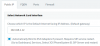
13812

Firewall Check result (find the full test attached):
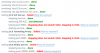
13813

I kindly wait your considerations.
 

Attachments

Last edited:
  • Like
Reactions: sr3
Well, I did more some tests, as follows:

1. On Link1 (home): I tested the webclient. I've called from Operator extension to my extension (on mobile, that keep with the status "connecting") and it has received the call successful. My mobile is Android.

2. I've set all parameters related with PUBLIC IP to my IPv6 scope global.

3. (I have found this troubleshooting in the 3CX's community)
3.1.Changed network from Static to Dynamic, let 3CX like that for a while (about 2 minutes).
3.2.Then re-set to static with my IPv6 scope global.

Then i've done a flushdns on my computer and waited about 11 hours. But my FQDN kept NOT resolving on new global IPv6 and none of my extensions get registration.

4. (I have repeated the test 3)
4.1.Changed network from Static to Dynamic, let 3CX like that for a while (about 30 minutes).
4.2.Then re-set to static with my IPv6 scope global.

Then i've done a flushdns on my computer. But my FQDN keeps NOT resolving on new global IPv6 and none of my extensions get registration.

I realized that during installation the system obtained only my Public IPV4, but on Activity Log I can see:

01/10/2020 7:29:50 AM - Local IP addresses detected: [my local IPv4,my scope global IPv6].
01/10/2020 7:29:51 AM - [CM506005]: Public IP=y scope global IPv6 is used for WAN communications through local interface with IP=my local IPv4.

From my home (Link1) I can ping my scope global IPv6 (Link2), but when I ping my FQDN it shows only:

PING my FQDN (the PUBLIC IPv4 detected during the installation) 56(84) bytes of data.

I kindly wait your considerations.
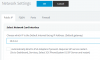
 
Adding info:

$ nslookup my FQDN 3CX
Server: 127.0.0.53
Address: 127.0.0.53#53

Non-authoritative answer:
Name: my FQDN 3CX
Address: the PUBLIC IPv4 detected during the installation
 
While this is a nice academic exercise, I imagine at some point the cost for a public IP has to be cheaper than your time. I don't know if anyone has done what you are trying to do, or if it's even supported in 3CX yet.
 
Hi @cobaltit!

Thank you for your reply. I agree with you. Time is money. But due to personal reasons I had some time to spend with these tests. So, follow some updates:

  1. I did some reinstallations to confirm the system behavior. First I've install it again using USB flash drive. After, I've rebuilt the pbx settings remotely using the 3CXWizard Tool. Yes, I did it using IPv6.
  2. I'm not sure if was just an unfortunate coincidence, but I couldn't create the SSL Certificate. I've tried creating it using the Certbot tool, as recommended by Let's Encrypt, but it couldn't connect the server (likely a firewall problem, according to it). I entered my 3CX FQDN correctly and I've tested if my IPv6 is routable, but my 3CX FQDN doesn't has a DNS AAAA record (it has only an A record). I think this was the problem.

Well, the 3CX Phone System always looking for IPv4 during the installation phase. Even putting my Global IPv6 as Static or Dynamic Public IP it change it for the ISP's Dynamic Public IPv4 and register the FQDN with it (3CX ignores my IPv6 in this phase).

  1. I can register extensions (softphone or mobile app) provisioning them with IPv6, even on Link1 (home), since that connected on wi-fi. Here it recognize that I have IPv4 and IPv6, and my FQDN, of course.
  2. I can connect the Management Console and Web Client using HTTPS URL and port 5001. I have a risk, though. I don't have the SSL Certificate.
  3. And I can monitoring my PBX on Customer Portal (where it say that I have two Public IP, one IPv4 and the other IPv6).

That's all for now.
 
I appreciate the feedback. @JohnS_3CX @YiannisH_3CX Can either of you confirm if 3CX is ready to work only using IPv6?
 
  • Like
Reactions: JLSeagull
@cobaltit I just received the notification that the SSL Certificate for my 3CX installation has been successfully renewed for the next 90 days.This has been done automatically.
 
Hi all (and @cobaltit @BrenttG ), just a feedback.

Well, I didn't receive any feedback from @JohnS_3CX or @YiannisH_3CX , but I can say that 3CX still is not completely IPV6 compatible. It always look for IPv4 first.

@cobaltit I had hosted my 3CX machine at AWS for tests (using the AWS Free Tier) and now, with an static public IP and all ports set in a security group everything is working fine (all extensions) and finally I got a green firewall.

But still talking about IPv6, for my surprise I didn't get IPv6 on my AWS instance.

I don't recommend to do what I did. But it was a good experience because I could to know all 3CX's limtations.

Thank you for the replies.
 
Hi,

currently, we do require dual-stack. Less on the PBX core itself but many Cloud services we provide for the PBX are limited to IPv4 at the time (working on it...)
 
honestly, for the foreseeable future, everything needs to be dual stack supportive, because while there are plenty of zealots out there pushing to make everything IPv6 and publicly addressable(even if its routing restricted), it simply is not going to happen, at least not in most of our lifetimes, IPv4 is too deeply sown into the canvas of applications, firmware, and networks around the world that we are unlikely to ever see a day when it is no longer used, or no longer needed.

what i do see happening more, is IPv4 to IPv6 Gateways becoming even more prevalent, and as people continue to build private IPv4 networks and intranets which are dual stacked, and keeping IPv6 more on the outside of the internal networks, or for external access, while all local resources tend to be accessed using IPv4. Im sure there are plenty of exceptions, but this is what i have been witness to thus far.
 
  • Like
Reactions: JLSeagull
Status
Not open for further replies.

Forum statistics

Threads
111,935
Messages
589,823
Members
164,817
Latest member
Innovative Advisory