Solved Salesforce Authorize Token fails with error=invalid_client_id&error_description=client%20identifier%20invalid

Status
Not open for further replies.

BernhardAT

Free User
Joined
Nov 15, 2023
Messages
8
Reaction score
3
Hello,

I tried to connect the 3CX-PhoneSystem with Salesforce with this manual (Step by Step):
https://www.3cx.com/docs/salesforce-crm-integration/

After refreshing the Token through the Authorize Button I get this error:
error=invalid_client_id&error_description=client%20identifier%20invalid

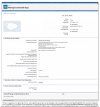
Attached you can see all the settings from the screenshot.

System: 3CX V18 (Self-Hosted in the Azure Cloud, Professional-License)
Salesforce Enterprise (Admin with MFA)

I would be thankful if someone could help me to solve this problem.

Thank you

Best regards
Bernhard
 

Attachments
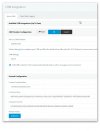
  • 3CXSalesforce.jpg
    3CXSalesforce.jpg
    103.2 KB · Views: 52
  • Salesforce3CXApp.jpg
    Salesforce3CXApp.jpg
    296.6 KB · Views: 52
Last edited:
Wait a few minutes when doing the Salesforce side, before clicking Authorize in 3CX. It takes time for modifications to replicate. We had this often when we tried to go too fast.
 
  • Like
Reactions: N_G and edossantos
This is correct, changes to the apps created in Salesforce take up to 10 minutes to be available.
 
  • Like
Reactions: Evolute IT
Hello,

after more than 12 hours I had the same problem.

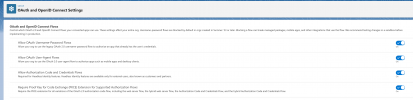
I checked the OAuth Settings and found that the "Require Proof Key for Code Exchange (PKCE) Extension for Supported Authorization Flows" Function in Salesforce under OAuth and OpenID Connect Settings was not activated.

After the change of this setting the error was gone.

Unfortunately, I get now the Error Code "Error occured: Value cannot be null. (Parameter 'key')".

Error in the Url: "/api/oauth2crm?error=invalid_request&error_description=missing+required+code+challenge".

What can be the cause of this error?
 

Attachments

  • OAuth and OpenID Connect Settings.png
    OAuth and OpenID Connect Settings.png
    205.6 KB · Views: 40
Sorry, I was too slow with the editing of my posting.

Yes, I turned off the Functions "Require Proof Key for Code Exchange (PKCE) Extension for Supported Authorization Flows", and the "Require Secret for Refresh Token Flow".

IP Relaxation is set to "Enforce IP restrictions, but relax for refresh tokens".

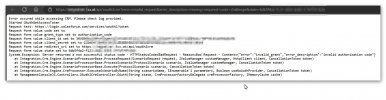
After these changes, I got this error:
Salesforce3CXAppErrorafterChanging.jpg
 
It's not receiving the auth code to grab the refresh token.

See "Code set to" and then the error is the code is missing.
 
  • Like
Reactions: edossantos
Thank you.

I understand but what can be the cause for it?
 
Have you modified the Salesforce template in any way?
 
No, nothing is modified.

I use the template SalsforceV2
 
you get this working? Running into the same issue following the guide.
 
Hello,

No, but I have on Monday an conference with one from the Salesforce support, because of have additional an another technical problem.
 
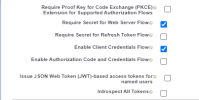
I got it. Just need to get the screen pops working but it is logging the calls. This is what I had to set:

2023-11-17_15-27-02.png

Enable Client Credentials Flow and then it allows me to verify and get the token.
 
After deleting the old CXPBX Connected App, which caused the error, I created a new App with a different name and the same settings.

Creating a new App solved the problem, and now all is running smoothly .

All other attempts to solve the problem with the old Connected App with different settings were unsuccessful.

Thank you!
 
  • Like
Reactions: edossantos
Maybe important for someone with the same problem.

Before creating the new Connected App, I changed a new user password without special characters.

This case is solved!
 
  • Like
Reactions: jed and Evolute IT
Status
Not open for further replies.

Members Online Now

Forum statistics

Threads
111,843
Messages
589,328
Members
164,680
Latest member
JV J