Salesforce Integration no contacts found

Status
Not open for further replies.

zcacinovic

Free User
Joined
Mar 2, 2020
Messages
5
Reaction score
1
Hi,
I just made 3CX integration with Salesforce and when I test connection it says that integration is OK but it cannont find this contact (despite the contact with this number exists). If i check the "create contact" option, everytime when I test connection it creates new contact with this number.
Also, when I try to call a number from salesforce I get message "localhost refused to connect ".
What I am doing wrong?
 
I just made 3CX integration with Salesforce and when I test connection it says that integration is OK but it cannont find this contact (despite the contact with this number exists). If i check the "create contact" option, everytime when I test connection it creates new contact with this number.
Can you share the output from the Logs tab? How did you configure the 3CX Console > Advanced > Contacts > Options? Did you configure it to lookup the last 7 digits as required for Salesforce?

Also, when I try to call a number from salesforce I get message "localhost refused to connect ".
What I am doing wrong?
Are you using the 3CX click to call extensions? How are you making these calls? Can you share a screenshot?
 
Hi Ernesto. I put 7 digits for lookup, and for the logs and click to call I will check tomorrow when I am back in the office.
thanks
 
hi,
finished the setup with success, and now I can click and call from salesforce, also I get call log on the contact activity. One thing doesn't work and that is "Automatically open Contact URL when CRM Integration is Enabled ". When I chose third option "Auto launch a Custom Contact URL using variables " it launches the URL but in Salesforce Lighting it is not so easy to make an object search through URL. I am wondering is the option 2 something that should work?
 
When you enable the Salesforce integration, you should check the option "Automatically open Contact URL when CRM Integration is Enabled" in your Web Client. This way, the Web Client will automatically popup the contact URL retrieved by the integration for the calling contact.

If this popup is not working, you should check the following:
1) Do you see the caller name retrieved from Salesforce?
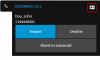
2) Do you see the contact card button on the upper right corner as in the following screenshot?
1583926807772.png
3) Check if the browser is blocking the popup, and in that case enable popups from the Web Client page.
4) If you're using 3CX v16 Update 4 and the new Chrome Extension, there is a known bug that causes that the popup doesn't happen. This is fixed in Update 5, so please wait for the final release in a few days.
 
OK, great, we will wait for the update 5 then.
 
  • Like
Reactions: edossantos
I just realised that I actually don't see this contact card in right upper corner.
I see the incoming number on the web client pop up window, but no contact name (despite this number is known phone number of one of my contacts).
When I try the third option Auto launch a Custom Contact URL using variables using the Salesforce Classic URL it findes this contact and I get pop up tab with the contact details.
 
When you test a contact lookup from the 3CX Console > Settings > CRM Integration > Test button, do you see a successful response? What's shown in the Logs window? Please don't include here any sensitive information.
 
Status
Not open for further replies.

Forum statistics

Threads
112,148
Messages
590,962
Members
165,168
Latest member
Stephan Eusebe