SBC best practices for small office

Status
Not open for further replies.

msiedschlaw

New User
Joined
Feb 16, 2022
Messages
11
Reaction score
2
Hello all. I have been setting up small offices, less than 10 extensions with the on-site SBC deployed on a Raspberry Pi. However, I am wondering what would the pros/cons be of just using the windows sbc client on a PC that is always turned on, on the same network, and has a static IP address instead of deploying Raspberry Pi's for small offices? This would be a workstation that gets some minor use daily by an employee. Thanks
 
Only caviet I can see are:-

- Expensive if dedicated
- Windows needs updates
- other software could conflict
- if it BSOD then phones go down
- Accidentally turned off then phones go down
 
Only caviet I can see are:-

- Expensive if dedicated
- Windows needs updates
- other software could conflict
- if it BSOD then phones go down
- Accidentally turned off then phones go down
Makes sense on all. As I am new to Raspberry Pi, I have some concerns about the stability and longevity of the hardware - although, have not experienced any issues yet. If a Pi does fail, would I be able to take it off the network and temporarily setup the sbc on a windows pc using the same static IP address of the original sbc and would phones come back online automatically?
 
In theory yes you should. Maybe the phones need a reboot. However, you could also set up Pi's in HA mode and have multiple if you're concerned. we've got a load of Pi's out in the field and i'd say have had no problems. Maybe the odd one more to every couple of months but sorted by a power cycle. Not had a hardware failure yet.
 
In theory yes you should. Maybe the phones need a reboot. However, you could also set up Pi's in HA mode and have multiple if you're concerned. we've got a load of Pi's out in the field and i'd say have had no problems. Maybe the odd one more to every couple of months but sorted by a power cycle. Not had a hardware failure yet.
ok...thanks for your time
 
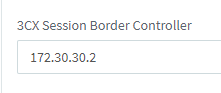
You can have two PI's SBC at the same location, and spread the phones across the sbc servers. In the event of a failure, you could move the phones across to the other sbc server

You change the SCX Session Border Controller

1655824791594.png
 
Hello all. I have been setting up small offices, less than 10 extensions with the on-site SBC deployed on a Raspberry Pi. However, I am wondering what would the pros/cons be of just using the windows sbc client on a PC that is always turned on
Another option is using Hyper-V and installing the SBC in a VM. Recovery could be moving the VHD or installing in another VM with the same IP.

The two things I didn't know about Pi initially that I wish I did was that Pi doesn't support an OS upgrade like Debian, so to get a newer OS one has to reinstall. Also I believe it was v18 that dropped support for Pi 3 so the ones we put in a couple years ago are out of date in two ways.

The "con" of using an existing PC is that if the PC/server dies the phones die with it, making it harder to call for help. Of course many people have cell phones now.
 
Another option is using Hyper-V and installing the SBC in a VM. Recovery could be moving the VHD or installing in another VM with the same IP.

The two things I didn't know about Pi initially that I wish I did was that Pi doesn't support an OS upgrade like Debian, so to get a newer OS one has to reinstall. Also I believe it was v18 that dropped support for Pi 3 so the ones we put in a couple years ago are out of date in two ways.

The "con" of using an existing PC is that if the PC/server dies the phones die with it, making it harder to call for help. Of course many people have cell phones now.
Good idea on the VM for the customers that already have that in place.

Thanks for the comments on the Pi. I have all version 4 currently. Other than the issue you mentioned, have you had any other issues with reliability or functionality with the devices as sbc’s?
 
issues with reliability or functionality with the devices as sbc
No issues.

Also note SSH isn't enabled by default on the Pis. That can be done in raspi-config, or creating empty file
/Volumes/boot/ssh.

And to clarify one thing, the Debian SBC doesn't self-upgrade the OS either. Just the Debian full 3CX.
 
No issues.

Also note SSH isn't enabled by default on the Pis. That can be done in raspi-config, or creating empty file
/Volumes/boot/ssh.

And to clarify one thing, the Debian SBC doesn't self-upgrade the OS either. Just the Debian full 3CX.
Yes, we enable SSH on all of them....thanks though, as I am sure someone will benefit from reading this in the future. I didn't realize that on the Debian sbc setup....again - thanks for the info
 
+2. I've implemented all of these SBC options for main office: VM on Hyper-V, tried PI and dedicated Windows PC. For me Hyper-V worked the best as PI3 was a little underpowered. PI3 worked great for a couple of phones. I've also installed SBC on my local daily driver Windows PC with a phone right next... All of these options work well.
 
  • Like
Reactions: Gasha
Status
Not open for further replies.

Members Online Now

No members online now.

Forum statistics

Threads
111,832
Messages
589,286
Members
164,662
Latest member
DejanMDS