SBC BUILT INTO SOME PHONES

Status
Not open for further replies.

Xeron

Trainee Partner
Basic Certified
Joined
Jun 10, 2022
Messages
25
Reaction score
2
Is this true, can we use a Yealink T54W as an SBC. This would be great for our sites that just have a single or couple of handsets.

Does anyone have any documentation or steps on how to configure a Yealink T54W handsets as an SBC attached to a self hosted Cloud 3CX PBX.
 
Yes, it is true that you can use a T54W as an SBC - "Router Phone"

I agree it is a great feature!

You will need to be on 3CX Server V18 Update 6 and have the T54W phone firmware updated.

More info & Instructions:
- https://www.3cx.com/blog/docs/sbc-router-phone/
- https://www.3cx.com/sip-phones/yealink-t5-series/#h.l6t6r8q6ax3e

Here is a brief video connecting a T54W as a router phone to 3CX Startup to give you an idea of the concept for when you setup a T54W to your self hosted instance.


I hope this helps!

Edit: Something to note, DECT handsets are currently not supported if you are talking about the T54W DECT version.
 
Last edited:
Awesome, thankyou so much
 
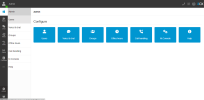
Sorry see below, when I follow the video I dont see the same type of Admin screen, I dont have a Configure a Phone option. see below
1676431495713.png
 
Ignore me I found it, using the instructions you sent
 
Hello,
i cannot do it with on premise system. can any one help me with :)
 
It's step 2.1 on the instructions. :) "Login to your 3CX Web Client and go to “Admin”." It's in the web client when you're logged in as someone with rights such as the new system owner role. (not the management console) It also has to be the first phone for that user.
 
  • Like
Reactions: N_G
i see,
thanks for help
 
It's step 2.1 on the instructions. :) "Login to your 3CX Web Client and go to “Admin”." It's in the web client when you're logged in as someone with rights such as the new system owner role. (not the management console) It also has to be the first phone for that user.
"It also has to be the first phone for that user"... it seems that deleting an existing user's IP phone (T53W in this case) is insufficient if they have the desktopapp and webclient phone to get that "Configure your router phone" option. Does that mean that user and extension needs to be deleted??

TIA
 
"It also has to be the first phone for that user"... it seems that deleting an existing user's IP phone (T53W in this case) is insufficient if they have the desktopapp and webclient phone to get that "Configure your router phone" option. Does that mean that user and extension needs to be deleted??

TIA
Adding on here...
So I did delete the User/extension I want to assign the router-phone to and tried to re-create that user/extension from the Webclient Admin. With that, I was able to get to Configure your router phone from the IP Phone menu *BUT* I could not find a way to override the extension number assignment, which was next-available. The only way I could find to manually assign a different extension number was to Add it via the Admin portal login. Then, I was back to square one, unable to add the router-phone.

Conclusion: as I see it now, the only way to add a router-phone to an existing user with an extension number that is, say, 199 when the last user extension is 150:
- Delete user 199
- add extensions 151 through 198
- then using webclient Admin, add extension 199 (assigned automatically).

Please, show me the light, this can't be right!
 
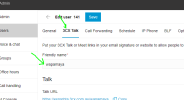
Not sure if this helps, but mine was quite straight forward once I removed all of the phones to the end user we want to have the SBC on his phone for, but I did have to do 1 thing which took me a little while to work out even though it was a simple process, see below I had to add a friendly name under 3CX talk or it wouldnt work but the Trick was the friendly name had to be in Lower Case or I couldnt save it to allow me to add the SBC Router to the phone and save it. Just thought I would mention this in case anyone else has the same prob
1676596521003.png
 
  • Like
Reactions: voxclear
Not sure if this helps, but mine was quite straight forward once I removed all of the phones to the end user we want to have the SBC on his phone for, but I did have to do 1 thing which took me a little while to work out even though it was a simple process, see below I had to add a friendly name under 3CX talk or it wouldnt work but the Trick was the friendly name had to be in Lower Case or I couldnt save it to allow me to add the SBC Router to the phone and save it. Just thought I would mention this in case anyone else has the same prob
View attachment 34324
@Xeron ^^^ THE ANSWER ^^^ to both the issues I was having. Thank you!
 
Yes, it looks like you can save a user with just a couple of fields on the management console, but going through the webclient, yoi need to resolve al the "red dots" before you save the user
 
  • Like
Reactions: voxclear
Is there a way to add the router phone using the old admin console?
 
Is there a way to add the router phone using the old admin console?
No. And the old console will be removed in the next version v20.
 
Status
Not open for further replies.

Members Online Now

Forum statistics

Threads
111,831
Messages
589,277
Members
164,660
Latest member
RJenkinsROCK