Solved SBC Debian install on AMD64

Status
Not open for further replies.

AWS2P

Silver Partner
Advanced Certified
Joined
Jan 9, 2014
Messages
5,077
Reaction score
1,096
HI,
i'm little bit lost in how to install SBC Debian not on RPi but on PC AMD64 from scratch. On debian website i've only found links for Debian 10. For windows everything is easy to find but not for Debian

  1. is there an iso to install SBC ?
  2. If iso exist where to DL from ?
  3. Is it same iso as 3cx server that need to be used ?
  4. is there specific 3cx documentation about complete install process?
 
Last edited:
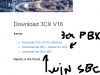
Thanks for answer , but sorry where are the links?


already seen this link but didn't found first step , iso debian perform a 3cx server DL and SBC link is for windows version , so where is the link for DEBIAN SBC on AMD64 ?
View attachment 12339
It's the same ISO. AMD64 and Intel X86_64 will work.

You simply use the ISO, it will install Debian then you can choose 3CX SBC and it will install by itself. As usual. Nothing different on AMD.
 
Hi Frederick,
i 'm surely unable to explain my problem properly or i don't understand answers,
My problem is to find a link for a debian SBC running on PC .
As i said links on DL page are
  1. for 3cx pbx server on debian
  2. SBC msi installer for windows
So am I completly crazy idiot or what?

Can you paste a link please ?
 
Hi Frederick,
i 'm surely unable to explain my problem properly or i don't understand answers,
My problem is to find a link for a debian SBC running on PC .
As i said links on DL page are
  1. for 3cx pbx server on debian
  2. SBC msi installer for windows
So am I completly crazy idiot or what?

Can you paste a link please ?
Download the same ISO as 3CX PBX. During install, it will ask if you want SBC or PBX on that machine.
 
i've tried with pbx iso this afternoon and at the end i got process to create new pbx, never seen something for SBC install
 
i've tried with pbx iso this afternoon and at the end i got process to create new pbx, never seen something for SBC install
Okay so make sure you downloaded the ISO from 3CX.

After Debian installation, the system reboots and auto-start the 3CX setup. Normally, the first thing it ask is "What to install?" and here you can choose 3CX SBC or PBX. Even Betas when some are available.

If you still can't get it to work, install Debian manually with another ISO and install 3CX manually following https://www.3cx.com/docs/manual/installing-debian-linux-pbx/. You just have to run apt install 3cxsbc instead of 3cxpbx.
 
  • Wow
Reactions: AWS2P
Frederick really thank you;)
you are better than me to find the good docs, haven't got this one before your answer
 
  • Like
Reactions: Evolute IT
I've got it, just re downloaded fresh iso , burn it on DVD , run it an now i've got choice to do a PBX or SBC, so nice when all goes right. :p
 
  • Like
Reactions: Evolute IT
New problems with SBC install:

  1. During install have done an error in authentication KEYID and install finished without giving me a second chance to type the good one. So after end of install a reboot has been done and now SBC ask me a login and password what do i need to use ? during install nothing has been asked.
  2. even i choose French language, keyboard is always Qwerty instead of AZERTY is there an easy way to set it in French AZERTY? from Where ?
  3. is there a command line to uninstall and restart sbc install from there
  4. 12342
 
Last edited:
New problems with SBC install:

  1. During install have done an error in authentication KEYID and install finished without giving me a second chance to type the good one. So after end of install a reboot has been done and now SBC ask me a login and password what do i need to use ? during install nothing has been asked.
  2. even i choose French language, keyboard is always Qwerty instead of AZERTY is there an easy way to set it in French AZERTY? from Where ?
  3. is there a command line to uninstall and restart sbc install from there
  4. View attachment 12342
  1. This should have been setup during Debian installation before 3CX setup.
  2. Same as above. Have you selected French (France)?
  3. Yes, you can remove it using apt purge 3cxsbc. To restart, use service 3cxsbc restart or simply reboot the machine.
  4. What's wrong with the list? You can scroll up/down to search for the right version. Is that the latest ISO? (I think it's always the same one tho)

Just a thought, do you have experience with Linux CLI?
 
  1. i found login was root and password
  2. yes french was selected during install
  3. nothing wrong with the list; this is a screen copy of online 3cx docs not what i got during install
  4. i'm not expert at all in linux i try to improve myself :)
Finally i restart from scratch and this is the same with French language, keyboard is always in Qwerty mode so it's not easy to use
 
  1. i found login was root and password
  2. yes french was selected during install
  3. nothing wrong with the list; this is a screen copy of online 3cx docs not what i got during install
  4. i'm not expert at all in linux i try to improve myself :)
Finally i restart from scratch and this is the same with French language, keyboard is always in Qwerty mode so it's not easy to use
2. That's odd. Azerty should work.

3. It's just not up to date, but there's a similar screen for 3CX setup after Debian is installed.

4. Let me know in DM if you need help. Oh, and I speak French, I'm from Montreal.
 
Finally with Frederick help, i got keyboard in French Azerty.

even with all locales set to french keyboard was always in QWERTY
so from SBC command line I have done
dpkg-reconfigure keyboard-configuration
then
dpkg-reconfigure console-setup

after that my keyboard switched to AZERTY
 
  • Like
Reactions: Evolute IT
you got me so baffled on this post I send the team to check it out.

Indeed there is an issue with selecting keyboard lang. It was not taken and forced US. Will be addressed in the next update, thank you for the input.

On the part of what can be installed, did you took the screener from our guide?
We see this (and should be also shown in your iso):
12364
Also when the provisiong information fail you can retry from the wizard or "cancel".
 
  • Like
Reactions: Evolute IT
@StefanW
Hi, first , Congratulations for your "new job" :)

Yes, screen copy is coming from online 3cx guide, during install i got the same you paste in your answer.

i miss a caracter in Key authentication, after that, nothing came to me to ask for a new try and install ended alone, with automatic sbc reboot. So i didn't knew how to do to connect SBC to PBX so I used trivial way --> restarting from scratch, this time with success but always in qwerty as you said it is bug.

Now I 'm less idiot than i was, i learnt some linux command and know more about SBC debian install ;)
 
Last edited:
  • Like
Reactions: Evolute IT
thank you.

I know how an FR keyboard looks like and I understand the hoop you had to go through ;-)
 
  • Like
Reactions: Evolute IT
thank you.

I know how an FR keyboard looks like and I understand the hoop you had to go through ;-)
Fortunately I know Debian and I could help him switch the keyboard once installed.
 
  • Love
Reactions: AWS2P
thank you for doing this!
 
Status
Not open for further replies.

Forum statistics

Threads
112,313
Messages
591,841
Members
165,458
Latest member
Kayla Norris