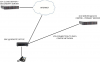
I am looking for a confirmation for a particular scenario I would like to deploy 3CX and the SBC.
This is the topology I would like to use.
I want to have an SBC installed at remote offices that can failover to the secondary 3CX server when the primary fails. The primary is to be housed at a colocation data centre and the secondary to be installed in the cloud (Azure or AWS). There is a VPN connection between the remote office and the data centre, while we will connect to the cloud server over the internet.
My question is will be be able to achieve failover in this situation? And also, should we use the enterprise license to install the servers?
Yes, it will work... there are a couple of options; and considerations...
SBC Enabled Failover - Under Trunk -> SBC -> Settings, specifying the failover IP
This will make the SBC send calls/regs to the failover IP specified if the primary server doesn't respond. Not dependent on Failover/DNS status of your 3CX Hostname.
DNS Failover - Enterprise License.... auto failover.
I've found this to be problematic. If there is a a break in the Internet. Carrier performs network maintenance, routing issue, BGP convergence, VPN down briefly etc... and the 2 systems do not see one another - the standby will initiate the failover protocol and become active, all while the active unit is still active. Oh how fun splitbrain is... you'll have some folks registered to one, others to another, people getting logged out of webclients and back in, just to get bounced again. Calls failing, calls going to voicemail, etc.
oh.... and resolving the splitbrain scenario, where both units are active... takes about 10-15 minutes of fumbling. Force the secondary to become the standby, force the primary to become standby, then force the primary to be active again - and hope DNS will update to the correct unit. There is no flip switch to correct this.
There is no sanity check, and no remote monitor to so to say keep quorum or verify. To the best of my knowledge, the passive unit will initiate the DNS chance when it becomes active.
This really seems to be designed for a case where both servers are in the same network, but you're wanting to make sure that if the bare metal downs, there is a second hardware/virtual ready to take over.
One more .... Auto Updates. You'll have to disable them. Any update that reboots the services, may cause a splitbrain due to undesired standby activation.
I feel a bit more confident now that I know that the topology will work and now that I as well know some of the challenges that I may face using failover in the SBC, I hope we don't face those issues.
Thanks again. I will try to post my findings on the forum when I get t implement.
But wait - there is more. If you call right now, we'll double the gotchas... just pay $19.95 for S&H...
3CX only allows 1 backup per day... That means there is only 1 restore point per day.
3CX has NO method to sync back changes from failover, or preserve them.
If you backup at 3am, restore at 3:30am - and at NOON you failover... it will have all data up to 3am. Not the biggest of issues...
If you or your customer is dependent on the data that is created while failed over(on the secondary system) - you must grab that before the next restore ... not quite sure what or how you're going to deal with that, as it will have a gab from 0300 - 12noon, then duration while failed over. This CDR's & Chat logs. Some HR departments may be very concerned about this for liability.
If you fail to grab this data prior to the next restore point, the data is gone to the best of my knowledge, as it will overwrite the standby system with next days backup - which understandably not contain data that was generated while failed over to the standby.
Just a few items to consider. As long as you are aware of this, you can plan and work around this.
I will certainly take all you have said into consideration. I don't imagine there will be a need to update the primary server with any config or recordings from the secondary, but I will look into how I can achieve that if necessary.