Solved SBC hardware capacity

Status
Not open for further replies.

BABALUCHA

Silver Partner
Advanced Certified
Joined
Jan 9, 2021
Messages
217
Reaction score
42
Hello Everyone
First of all thanks for stopping by and looking into this.
I have a quick question . How do i find out how much RAM and how big CPU i need to configure SBC for one of my clients where i m going to have about 9 Voip Phones and give all of them each others BLF keys and also make 4 LINE keys and 1 speed dial key. So that makes total of 13 keys on each phone. Now that being said it is 117 keys total .Now that being said how do i chose the right hardware, I did install raspberry pi before but this time i m thinking to install a window machine .
 
That is exactly right, you will need a unique SIP Port for every IP Phone that are on the SAME LAN. you will also need a unique RTP Port Range too.
 
  • Like
Reactions: BABALUCHA
IMO, if you can, use an SBC, it's another planet that stun:
- No port forwarding, alg configuration, static public IP needed in remote location
- More security, PBX and SBC talk through a tunnel
- Pnone provisioning works as a local installation
- Easy troubleshooting. Just connect to the PBX to control all phones
Just a small PC (or Rasp) with the sbc software installed in remote location;)
 
IMO, if you can, use an SBC, it's another planet that stun:
- No port forwarding, alg configuration, static public IP needed in remote location
- More security, PBX and SBC talk through a tunnel
- Pnone provisioning works as a local installation
- Easy troubleshooting. Just connect to the PBX to control all phones
Just a small PC (or Rasp) with the sbc software installed in remote location;)
Thank you .....i will install Raspberry Pi4 with PI4-4GB-EXT128EW-C8-BLK ...hopefully it is big enough for 10 phones and 10 BLF keys in each :)
 
That is exactly right, you will need a unique SIP Port for every IP Phone that are on the SAME LAN. you will also need a unique RTP Port Range too.
Thank you Chris :) Great info .will keep in mind for future installs.
 
  • Like
Reactions: ChrisC_3CX
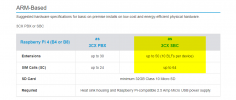
Thank you .....i will install Raspberry Pi4 with PI4-4GB-EXT128EW-C8-BLK ...hopefully it is big enough for 10 phones and 10 BLF keys in each :)
The good news is you don't have to hope as it's already specified in the hardware requirements link posted earlier:

1643352255200.png
 
Thank you Chris :) Great info .will keep in mind for future installs.
You're very welcome! do let us know if you need anything else!;)
 
  • Like
Reactions: BABALUCHA
You're very welcome! do let us know if you need anything else!;)
Hello Chris
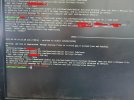
i have paid Expedite shipping and got my 2 Rasberry Pi4 and settings up the first one (had to put it together this time,last time was assebled out of the box) ,i have setup SBC on 3cx intance but when i run the command wget to get ISO from 3cx site after putting url and Auth key , the system is saying that cannot obtain proviisional data .any idea why ?Snapshot.jpg
 
Last edited:
Hello Chris
i have paid Expedite shipping and got my 2 Rasberry Pi4 and settings up the first one (had to put it together this time,last time was assebled out of the box) ,i have setup SBC on 3cx intance but when i run the command wget to get ISO from 3cx site after putting url and Auth key , the system is saying that cannot obtain proviisional data .any idea why ?View attachment 27487
It looks like the wrong OS version is installed on them. I see 'bullseye' which is Debian 11.
Follow the instructions from the beginning that we have here:
https://www.3cx.com/docs/installing-pbx-raspberry-pi/

Start by reflashing the SD and use the ISO in the guide.
 
  • Like
Reactions: BABALUCHA
It looks like the wrong OS version is installed on them. I see 'bullseye' which is Debian 11.
Follow the instructions from the beginning that we have here:
https://www.3cx.com/docs/installing-pbx-raspberry-pi/

Start by reflashing the SD and use the ISO in the guide.
Hello NickD
i have got it working ,i noticed that this is only command based OS,for future could you please let me know if i want GUI based OS than which one to get ?
Questions1
1 just right after finishing the SBC Install is is asking about cluster .Do i have to create an SBC HA Cluster ?
2 i noticed there is "UPDATE" appears beside the SBC but when i check the SBC and click UPDATE nothing happens. why i m not able to update SBC on 3cx side.
 
It looks like the wrong OS version is installed on them. I see 'bullseye' which is Debian 11.
Follow the instructions from the beginning that we have here:
https://www.3cx.com/docs/installing-pbx-raspberry-pi/

Start by reflashing the SD and use the ISO in the guide.
Hello NickD thanks a lot for shining light on this .....i was able to get both Raspberry working on first shot.......great help.......Quick questions :
i factory reset all the Yealink t48U phones by logging in through GUI with browser password (that was created by 3cx at the time when provisioned them with STUN server) . and all the company A phones asked for username and password (which it did when i first provisoned them with STUN ) and i put in username as extension number and password as the VM code and it worked ,phones got provisoned thrpough the SBC( i can see on the PHONES section) but on the other hand when i reset the Company B phones the same way , they all came back for factory reset but none of them asked for username and password and i had to goto PHONES section and assigned them to each extension they belonged to.i hope both these ways are ok , i mean the phones are provsioned and i was able to use them ,all the BLF kesy showed up and eyerything.

Concern :
Why both companies phones are showing up on each others PHONES section for provisioning option. ?Is it normal ? Would it go away in a few week ?Again thanks in advance all this help :)
 
Hi!

i have got it working
Glad we could help! :)


,i noticed that this is only command based OS,for future could you please let me know if i want GUI based OS than which one to get ?
We don't really recommend installing the GUI version as it consumes hardware resources without a real need to do this. SBCs are generally "set and forget" and you only need to access them if something goes wrong, even upgrades of the SBC software can be done via the 3CX Management Console.
Even in the case of an issue though, usually the most direct solution is just to re-flash the SD and set it up from the beginning that should take no longer than 10-15 minutes.
To answer your question though, we don't have an image with a GUI that we recommend.

1 just right after finishing the SBC Install is is asking about cluster .Do i have to create an SBC HA Cluster ?
No, this is completely optional. You can read about it here though:
https://www.3cx.com/docs/sbc-high-availability-cluster/

i factory reset all the Yealink t48U phones by logging in through GUI with browser password (that was created by 3cx at the time when provisioned them with STUN server) . and all the company A phones asked for username and password (which it did when i first provisoned them with STUN ) and i put in username as extension number and password as the VM code and it worked ,phones got provisoned thrpough the SBC( i can see on the PHONES section) but on the other hand when i reset the Company B phones the same way , they all came back for factory reset but none of them asked for username and password and i had to goto PHONES section and assigned them to each extension they belonged to.i hope both these ways are ok , i mean the phones are provsioned and i was able to use them ,all the BLF kesy showed up and eyerything.

Concern :
Why both companies phones are showing up on each others PHONES section for provisioning option. ?Is it normal ? Would it go away in a few week ?Again thanks in advance all this help
The Company A Phones, you provisioned via RPS, this is what the method is called when you enter the Ext Number a VMail password directly on the phone.
For SBC, the correct way to provision is like this:
https://www.3cx.com/sip-phones/yealink-t4-series/#h.h6ekadsfo11g
So, for the Company B phones, as they showed up in the "Phones" tab, you can do this.

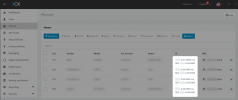
Note that if a Phone is provisioned via SBC correctly, they should appear like this:
1643701982260.png

If the Company A phones don't appear like this, then Factory Reset them again and provision them as explained in the link above.
 
  • Like
Reactions: BABALUCHA
Hi!


Glad we could help! :)


We don't really recommend installing the GUI version as it consumes hardware resources without a real need to do this. SBCs are generally "set and forget" and you only need to access them if something goes wrong, even upgrades of the SBC software can be done via the 3CX Management Console.
Even in the case of an issue though, usually the most direct solution is just to re-flash the SD and set it up from the beginning that should take no longer than 10-15 minutes.
To answer your question though, we don't have an image with a GUI that we recommend.


No, this is completely optional. You can read about it here though:
https://www.3cx.com/docs/sbc-high-availability-cluster/


The Company A Phones, you provisioned via RPS, this is what the method is called when you enter the Ext Number a VMail password directly on the phone.
For SBC, the correct way to provision is like this:
https://www.3cx.com/sip-phones/yealink-t4-series/#h.h6ekadsfo11g
So, for the Company B phones, as they showed up in the "Phones" tab, you can do this.

Note that if a Phone is provisioned via SBC correctly, they should appear like this:
View attachment 27551

If the Company A phones don't appear like this, then Factory Reset them again and provision them as explained in the link above.
Hi NickD
Thank u .......great help again .......... as i have mentioned before Company A i added all the phone by putting in the extension number and VM passwd (because that was the only option i had at that point ) , but Company B never asked that and i had add them by assigning the extension number ......i still don't understand that after factory resetting them all why only Company A all of the phones asked for username and password but Company B never did.
But interesting thing is that both companies phones are showing up correctly , the way you have explained above .and also i m attaching the snapshot from Company A Dashboard ,so that being said now should i still factry reset the phone and re provisioned them again and or now since as long as they are registered through the SBC , we don't have to worry about anything ..?1643726057697.png
 
Hi NickD
Thank u .......great help again .......... as i have mentioned before Company A i added all the phone by putting in the extension number and VM passwd (because that was the only option i had at that point ) , but Company B never asked that and i had add them by assigning the extension number ......i still don't understand that after factory resetting them all why only Company A all of the phones asked for username and password but Company B never did.
But interesting thing is that both companies phones are showing up correctly , the way you have explained above .and also i m attaching the snapshot from Company A Dashboard ,so that being said now should i still factry reset the phone and re provisioned them again and or now since as long as they are registered through the SBC , we don't have to worry about anything ..?View attachment 27572
The reason Company A phones gave you the RPS prompt on the phone display is because you had set them to "STUN" in the 3CX Management Console within the last 7-10 days, and the phones will keep doing this for up to 2 weeks after the last time you set STUN in the 3CX Management Console.
Nothing to worry about though, if they show up correctly that should be fine, just know that the next time you do Factory Reset a Company A phone, it will problably not happen and you will have to configure it as you did the devices of Company B.
 
  • Like
Reactions: BABALUCHA
The reason Company A phones gave you the RPS prompt on the phone display is because you had set them to "STUN" in the 3CX Management Console within the last 7-10 days, and the phones will keep doing this for up to 2 weeks after the last time you set STUN in the 3CX Management Console.
Nothing to worry about though, if they show up correctly that should be fine, just know that the next time you do Factory Reset a Company A phone, it will problably not happen and you will have to configure it as you did the devices of Company B.
Hi NickD
Thanks for quick response .........why Company A phones appear in Company B's PHONES section to be added with port 5059 and vice versa for Company A. Is that normal since both companies share the same Internet under the same roof and are the same LAN. ..?
 
Hi NickD
Thanks for quick response .........why Company A phones appear in Company B's PHONES section to be added with port 5059 and vice versa for Company A. Is that normal since both companies share the same Internet under the same roof and are the same LAN. ..?
It's fine, that's just the port the phone is using.
 
  • Like
Reactions: BABALUCHA
It's fine, that's just the port the phone is using.
Hello NickD
Thank you again for the help ...............i learnt a lot ...............GREAT HELP Thank you so much.....i guess after a few weeks we can mark this SOLVED ....the customer is not really using the phones right now , they will open for business in a week or two :)
 
  • Like
Reactions: NickD_3CX
Hello NickD
Thank you again for the help ...............i learnt a lot ...............GREAT HELP Thank you so much.....i guess after a few weeks we can mark this SOLVED ....the customer is not really using the phones right now , they will open for business in a week or two :)
Excellent!
I am glad we could both help you with the issue AND help you learn a few new tricks ;)
 
  • Like
Reactions: BABALUCHA
Status
Not open for further replies.

Forum statistics

Threads
111,974
Messages
590,081
Members
164,899
Latest member
mazet