SBC on Debian VM synology

Status
Not open for further replies.

avanzandvliet

Free User
Joined
Oct 2, 2023
Messages
9
Reaction score
0
Hi,

I'm new to the forum, I am Alexander.
I'm running a 3CX installation on a VM on a Synology NAS. It has been running succesfull for many years. it's running V18 latest update.

Now to overcome some connection issues with our remote office, we need to install a SBC in the remote office. (bought some new IP-phones)

When we installed the SBC on a windows machine there, it connects without an issue to the main 3CX installation. Within a second. But when i try to install the Debian ISO on a VM on the local Synology there. It will not connect to my main 3CX installation. It will give an error: Unable to reach 3CX installation. I tripple checked all the provisioning links. Firewall settings and ports.

Can anyone help me with this? If you need more information please ask. Thank you in advance.

Best regards,

Alexander.
 
I tried your step.

I gives an error: No SSL certificates were found on powerdirect.my3cx.nl. Make sure that the name resolves to the correct server and that the SSL port (default is 443) is open on your server's firewall.

but I do not know how to solve this. the port is open. and reachable. And when i'm using my manamegent page. i do not get errors and it has a certificate.
 
It seems that you are using port 5001, did you ensured that?
 
Sorry, i did not use the port of 3cx. In my case 5101. When I add that the SSL resolves. and everything is green.

So, that does not solve the problem that the VM will not connect to 3cx. sadly.

Any other ideas?
 
It seems that your certificate has not been renewed.
Are you able to activate, restart the PBX services and make another attempt?
 
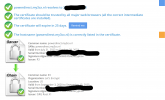
Hi, thank you for the reply. I restarted the 3cx server. Ran de SSL checker again. these are the results:

Schermafbeelding 2023-10-04 090113.pngThe windows based SBC is connected stable. (running on a regular work pc) not ideal.

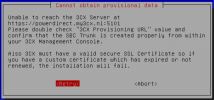
I have also tried to connect the VM SBC again. this is the result:

Schermafbeelding 2023-10-04 090825.png
 
Last edited:
I do not see any issue with the FQDN and port.
It seems that the SBC is not able to resolve it. Have you checked the DNS on the SBC side?
 
Hi,

Thank you for your quick replies. I did a ping from the VM (debian), to www.google.com. And it got a good reply no packet loss.

That tells me I think that the DNS is working?
 
Are you able to resolve the FQDN from that location?
Have you also checked whether you are blacklisted?
 
Hi,

I tried the following:

telnet powerdirect.my3cx.nl 5101

it resolved into the ip. and connected.

i also check the blacklisted ips it is not blacklisted.
 
Try to install the SBC on a different Hypervisor or for example on your PC using the Windows SBC, the issue is the same?
 
No isue is not the same, we installed it on a windows pc in the same network. (a workstation of a coworker). and it installed and connected without an issue.
 
I believe this has to be checked on your Synology NAS as it is not related with the PBX or SBC installation.
 
Hmm that is interesting. Lets see how to resolve that.

Thank you for all your help.
 
Hi,

i got a new error message that flashed. i recorded it, it contains the senctence: "Warning: Cannot obtain provisional data ...."

The rest is the usaual message. Does this ring a bell somewhere?

Thank you again.
 
Is it possible to know the whole error?
 
Status
Not open for further replies.

Forum statistics

Threads
111,974
Messages
590,081
Members
164,899
Latest member
mazet