- Joined
- Aug 23, 2022
- Messages
- 65
- Reaction score
- 4


telnet fqdn 5090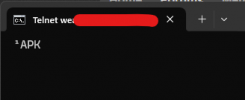
Thanks, tried that one, no joy.Hi,
For starters, reboot the SBC phone in case it's having a bad day. Let's see if that clears the issue.
thanks, will try that.Does 3CX pass firewall test?
Is there an SBC at another site you can monitor to see if this drops at the same time?
How far do you want to test? vs swap out the sbc
is their internet dropping?
What is the sbc connected to? is there a hw failure on its path out to the internet
next steps - network captures.
you could try upping the logs on the phone and reviewing them too.
when the SBC goes down, from a device on the network, do a telnet test
Code:telnet fqdn 5090
if it can talk to 3cx you should get something like this back
View attachment 50390
I'll look into that, get them to move it to a wired position if it's on wifi.Also, if it is used as wireless, look into that, maybe wifi interference - and more generally SBCs should not be set up over wifi.
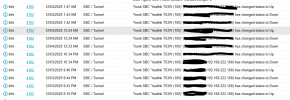
So their MSP finally reached out to me. The T53W SBC phone has a wired connection, it is getting an IP address and a PC connected through it reaches the internet. They do not see any issues on the firewall (looking for the phone's IP address reaching out to FQDN. Is the command > telnet xxxxx.yy.3cx.us 5090 ? I tried that from my office using putty, not connecting (but might be doing it wrong). Could the problem be at the 3cx server?Does 3CX pass firewall test?
Is there an SBC at another site you can monitor to see if this drops at the same time?
How far do you want to test? vs swap out the sbc
is their internet dropping?
What is the sbc connected to? is there a hw failure on its path out to the internet
next steps - network captures.
you could try upping the logs on the phone and reviewing them too.
when the SBC goes down, from a device on the network, do a telnet test
Code:telnet fqdn 5090
if it can talk to 3cx you should get something like this back
View attachment 50390
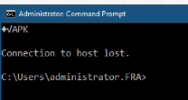
That was from their network. The SBC is up but no physical phones are registering, no matter whether their pegged to the server SBC or the T53W. .When you run the telnet command you get that APK text returned which shows you're able to communicate with 3CX over the tunnel port. The connection lost is to be expected.
If you couldnt reach it, you wouldnt get the "APK".
Are you able to do this from their network when their phones go down?


That was from their network. The SBC is up but no physical phones are registering, no matter whether their pegged to the server SBC or the T53W. .
Founded in 2005, when VoIP was an emerging technology, 3CX has gone on to establish itself as a global leader in business communications.