SBC with multiple Ethernet

Status
Not open for further replies.

eds.pare

Free User
Joined
Aug 1, 2021
Messages
70
Reaction score
8
Hi Anyone have tried this scenario.

I have one network which has my intercoms(192.168.1.X) this network can't connect to internet its totally block.

So i setup an SBC that has 2 ethernet interface. One connects to the 192.168.1.X and one that connects to internet says 192.168.2.X(nat to a router)

When i try this. I can call the user. Me(4545) the test intercom (4546)

But when i call 4545 from 4546. i can't seems to go in.

Any idea on this?

Thanks.
 
While 3CX can have two NICs , This is the first time I've seen a question about using an SBC with two.

I suspect that while you might be able to get this working, and perhaps someone has, that can offer a work-around, it is designed for use on a LAN, that has Internet connectivity.
 
While 3CX can have two NICs , This is the first time I've seen a question about using an SBC with two.

I suspect that while you might be able to get this working, and perhaps someone has, that can offer a work-around, it is designed for use on a LAN, that has Internet connectivity.
The things is i don't have any control on the router of that network, i want to connect to 3cx with.
 
@eds.pare

As leejor said, this is not a scenario that is tested so it's outside the scope of what we have designed the SBC to do.

You can try something though to see if it works.
I'll say from now, if it works, great. If not, you'll have to make it work with 1 NIC.

My idea:
  1. Log into your SBC via SSH
  2. edit the following file: /etc/3cxsbc.conf.local
  3. Uncomment line "LocalSipAddr" and add the SBC IP of the NIC you want the IP Phones to talk to.
    Based on your information, that line would become something like:
    Code:
    LocalSipAddr=192.168.1.X    # 0.0.0.0 to auto detect on start
  4. Restart the SBC service with: systemctl restart 3cxsbc
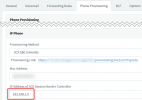
  5. In the Management Console, in the Extension Settings of each device, make sure you have entered the IP Address of the NIC the IP Phones will be contacting:
    1627904776582.png
  6. If you need to change any settings, reprovision the IP Phones.
 
I see it this way
 

Attachments

Status
Not open for further replies.

Latest Posts

Forum statistics

Threads
111,982
Messages
590,119
Members
164,908
Latest member
FarizQasimov