Scheduled FTP Backups Not Running (Manual Backup Works) v20

Jay Leccio

Silver Partner
Advanced Certified
Joined
Feb 14, 2018
Messages
61
Reaction score
9
We have a 3CX v20 (Linux) system where manual backups run successfully, but scheduled backups do not execute.

Key points:
  • FTP destination is reachable and working (manual backup succeeds).
  • Scheduled backups appear not to run at all.
  • Backup log directory is empty: /var/lib/3cxpbx/Instance1/Data/Logs/Backup
  • No success or failure logs are generated for scheduled backups

    Any assistance would be appreciated.
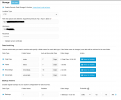
    1766126163161.png
 
Hi,

Check the folder permissions on the destination server - the FTP user is probably missing the execute (x) permission for that folder.
 
Thanks. Manual backup works when tested. so i guess no issue on FTP side pf things.
 
Thanks. Manual backup works when tested. so i guess no issue on FTP side pf things.
There is a difference, manual only writes a file - write permission on linux - auto renames(moves) the older archives - folder eXecute permission on linux. Please check.
 
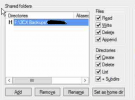
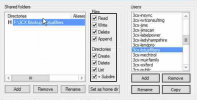
It already have all permissions as it was working until last week. 1766128437467.png
 

Attachments

  • 1766128365963.png
    1766128365963.png
    188.7 KB · Views: 3
Hi,

Can you share any relevant logs from both the PBX and FTP side? There should be some mention of the cause, and if on verbose it it would be best.
 
i have checked 3cd logs and there are no indication that 3cx is attempting scheduled backups. not logs at the Filezilla server as well. can anyone advise where in 3cx we can see any logs of the backup attempts?
 

Attachments

Hi,

Relevant entries would be in the System Service log - on a Debian install: /var/lib/3cxpbx/Instance1/Data/Logs/3cxSystemService.log

Entries would look similar to these:
#Logged when the backup settings are saved (UTC Time)
Code:
2025/12/22 09:16:11.033|0006|Info| [_3CX.Extensions.Hosting.ScheduleListenerService] Job scheduled: Trigger 'DEFAULT.BackupTrigger':  triggerClass: 'Quartz.Impl.Triggers.CronTriggerImpl calendar: '' misfireInstruction: 2 nextFireTime: [B]12/22/2025 07:17:00[/B] +00:00

#Logged when the scheduled backup is triggered
[B]2025/12/22 09:17:00[/B].504|0021|Debg| [Quartz.Core.JobRunShell] Calling Execute on job BackupRestoreScheduleService.BackupJob
 
Thanks, here are logs from /var/lib/3cxpbx/Instance1/Data/Logs/Backup/20251222
 

Attachments

1. You keep referencing Backup folder which has no connection to backups whatsoever - it's for storing of older (rotated) log files.
2. The file you provided just shows that you scheduled a backup at some time in the future. We need the log file when actual backup time happened.
 
  • Like
Reactions: KyriacosS_3CX
Hi, here is the 3cxSystemService file from /var/lib/3cxpbx/Instance1/Data/Logs/
 

Attachments

The backup fired and was executed successfully (see the attached file). I have a feeling that you expect the file to land someplace else...
 

Attachments

  • Like
Reactions: KyriacosS_3CX
Hi, here is the 3cxSystemService file from /var/lib/3cxpbx/Instance1/Data/Logs/
Taking this line and below:
2025/12/22 19:00:00.003|0021|Debg| [Quartz.Core.JobRunShell] Calling Execute on job BackupRestoreScheduleService.BackupJob
there seems to be a backup running just fine. Was this not seen on the server? Was it manual?
 
We have a 3CX v20 (Linux) system where manual backups run successfully, but scheduled backups do not execute.

Key points:
  • No success or failure logs are generated for scheduled backups
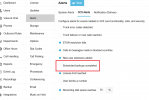
You should receive an email for failed backup. If you want to get one on success, too, enable this:
1766391572098.png
 
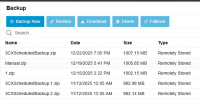
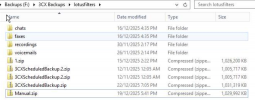
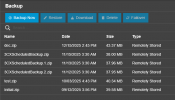
yeah, that's the thing, here are the screenshots of the (1) 3cx backups as well as the (2) ftp location - both no files modified scheduled.

but looks like it has worked now - AFTER I disabled/reanabled the remote Data storage. that was weird. Thanks for checking anyway.

1766393195965.png1766393237783.png
 
From your log one can see that the backup was successful and the older files got rotated. It seems that you have 2 backups set, so the most recent is 3CXScheduledBackup.zip and the previous is /3CXScheduledBackup.1.zip:
2025/12/22 19:05:36.177|0021|Info| [_3CX.Filesystem.FTP.FtpFilesystem] FTP: file /3CXScheduledBackup.1.zip has been renamed successfully
2025/12/22 19:05:36.460|0021|Info| [_3CX.Filesystem.FTP.FtpFilesystem] FTP: file /3CXScheduledBackup.zip has been renamed successfully
2025/12/22 19:05:36.752|0021|Info| [_3CX.Filesystem.FTP.FtpFilesystem] FTP: file /3CXScheduledBackup.zip.tmp has been renamed successfully

Strange thing is:
1. You say "no attempt to store any files found on FTP side" - how come?
2. I don't see /3CXScheduledBackup.1.zip yet two of /3CXScheduledBackup.2.zip?
 
All resolved anyway after i toggle that Remote storage. But here is another similar 3cx system with daily backup schedule. notice the last backup date was 12/15/2025 - this was when I manually triggered it.

1766394761155.png
 
Check its logs the very same way like we did here.
 
  • Like
Reactions: Jay Leccio

Latest Posts

Forum statistics

Threads
111,953
Messages
589,916
Members
164,851
Latest member
DrunkeMeister