Scheduled restore - failing after first restore

Status
Not open for further replies.

andreyIR

Basic Certified
Joined
Jan 4, 2020
Messages
7
Reaction score
0
Hi,

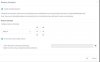
Scheduled restore, option "Do not start services after restore" is specified. After first scheduled restore - unable to access management console, next schedule restore is not working, need to start service "Management console" manually to start it working again.

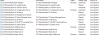
List of running services after scheduled restore:
13711

Using latest 3cx version 16.
 
I do not believe most if the items from that list is related, but here we go:
  • Professional Annual 16.0.910
  • Windows Server 2012 R2
  • On-premise local server
  • Fanvils x3,x4
  • Local, stun
  • Fusion connect
  • YES
  • YES
It just stopped working after one of the updates, always reproduced.
 
Try to update your PBX to latest 16.0.4.493 release and do a new try.

where are your backup located? locally? cloud?
 
I'm on the latest available version. same problem.
Backup is copied from primary server to backup via ftp and stored on backup server.
 
Any word from 3cx?
 
Hi Andrey

Are you using the 3CX method of failover, with the same Enterprise key on both machines?

Or is this something you setup manually?
 
It was always used with the same key, Fail-over is disabled.
Scheduled restore is enabled with these params.
Before 15.5 it just restored the system every day with the fresh backup and stopped services. Now it restores only first time, after it just stops working.
14040
 
This is the expected behavior when you select "Do not restart services after restore"

The management console does not start on this system effectively because you told it to not start the services and as a result you cannot access it. The next scheduled restore will also not run because of the services being stopped.

It sounds like you want the failover functionality of 3CX but are not using the "Failover" function with an Enterprise key but instead you are trying to do it manually.
 
Hmm, but it worked for years and just stopped at some point.
And yes - I just need a copy of my system with the latest backup restored every day, but not running any SIP services.
What is the purpose of "Scheduled restore" in this case if it works by a schedule only once and then stops?
 
Ok for the specific function you need, you will have to use 3CX failover mode with an Active server and a Passive one that restores the settings of the first one without running any SIP services.

The option to stop services is mainly meant to be used in conjunction with 3CX Failover mode which keeps monitoring the active server but keeps its services stopped until it is triggered to take over from the main active server once it goes down and no longer responds.
 
  • Like
Reactions: Evolute IT
Status
Not open for further replies.

Forum statistics

Threads
111,935
Messages
589,823
Members
164,817
Latest member
Innovative Advisory