Solved Scheduling Queue Answered / Unanswered Calls (Graph) Report Daily

Status
Not open for further replies.

ckobayashi

Free User
Joined
Jan 12, 2021
Messages
34
Reaction score
8
Hello all,

I'm trying to schedule the above mentioned report to send daily but it seems I am unable to specify a dynamic timeframe for the report. It looks like I must manually specify a date for the time scale which does not make sense. If I select a specific date and schedule this report to run daily will this report continue to send report data for the same date each time?
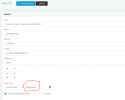
 

Attachments

  • 3cxreportansweredunansweredcalls.PNG
    3cxreportansweredunansweredcalls.PNG
    19.6 KB · Views: 13
Hi @ckobayashi,

You can change the 'hour-by-hour' to 'day-by-day' which will ask you to choose the month instead of the day. You can also do a month-by-month which will ask you to select the year.
 
Hi @VasilisV_3CX,

Unfortunately this is not helpful as our leads would like a daily report to evaluate the hourly queue call distribution for the previous day.

Is there another way I can schedule the Queue Answered / Unanswered Calls (Graph) report to run daily and display the previous day's calls without having to run the report manually every day?
 
Hi @ckobayashi

I think we can show you what you need by our JEDWare tool. Please have a look at https://jed-ware.com, to se the report functionality, or you can gain a free trial, to test with your own live data.
 
Hi @ckobayashi,

Try and set up a scheduled report and when selecting the date, select the day before at 23:59. This should provide you with the report daily, of the previous day's outcome. Give that a try and let me know if it works for you.
 
@VasilisV_3CX,

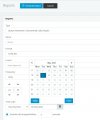
Thanks. The limitation appears to be the Time Scale. I must select a specific date for the Hour-by-Hour option which reports on calls for that specific date. For other reports I am able to select "Yesterday" as the report Range but for the Queue Answered / Unanswered Calls (Graph) report there is no option to select "Yesterday."

Clipboard01.jpg
 
@jed,

Thank you for your reply. We would like to exhaust all out-of-the-box options before exploring third-party solutions. I have made note of your product in our task.
 
  • Like
Reactions: jed
Hi @ckobayashi,

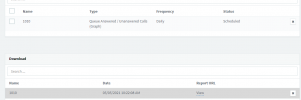
Yes I'm aware that it asks you for a date input, what I mean is to select the date one day prior. As a test I created a new report (titled: 1010) and I ran it at 10:22, which completed 8 seconds later. Notice that the scheduled report remains, so tomorrow at 10:22, I expect the next report.

1620199555049.png
 
Hi @VasilisV_3CX,

Thank you for your reply. I tried your suggestion and the report does send the previous day's information as expected, however the date in the next schedule report remains the same static date of 4 May, 2021. This means that tomorrow's report and all future reports will also report on 4 May 2021. I need the date to automatically increment to 5 May 2021 when the next scheduled report runs, and to 6 May 2021 for the report after that.
 
What my colleague @VasilisV_3CX wrote is correct. the way to schedule recurring daily Graph reports is:
  1. Select the Graph Report
  2. Set Frequency to "Daily"
  3. Time scale: Hour-by-Hour
  4. Date. This is the tricky part. If today is the 6th of May, you need to select the 5th of May
  5. Add the Queues you want
  6. Press OK
Important!
Once you have created the scheduled report, you must not edit it again, because this will break the scheduling for the previous date.
If you need to check something, you should delete, then re-create it from scratch following the above steps.
 
@NickD_3CX

Thank you for clarifying. I have confirmed this works as described.
 
Status
Not open for further replies.

Forum statistics

Threads
111,974
Messages
590,081
Members
164,899
Latest member
mazet