Some users that use Chrome Version 98.0.4758.102 are not able to share their screen because the menu is empty. I am using the same version and it is working fine. Also they can share their screen if they use the 3CX Desktop App or Edge.
I tried to reproduce this, but wasn't able to. Is there anything they're doing differently to you when joining / setting up the meeting that we can try to replicate it? For now, I can tell you that WebMeeting is working fine on my side without issue.
Have they tried to join using an Incognito Window in Google Chrome?
I was sitting beside those users and can tell you that they do it exactly the same I do it. Anything else I can provide to support root cause analysis?
One user reported that it works fine if he uses the incognito mode. Next we try to clear cache, cookies and deactivate add-ons. Maybe this way we could get further.
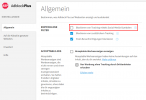
We found the reason for this problem. We are using an add blocker on our clients (https://adblockplus.org/en/download). If someone goes to settings and activates the checkbox "block tracking by social media symbols" then you are not able to share your screen.
To me it seems to be an issue of the add blocker as the symbols shown in 3CX are no social media symbols but maybe they have a special tag or property that makes the add blocker belive it is a social media symbol.