- Joined
- May 20, 2020
- Messages
- 4
- Reaction score
- 0
Hello,
we are running the latest 3CX (auto update on) 16.0.5.611 and the option to disable TLS 1.0 1.1 to have compliance seems not to affect the webserver settings.
What can be checked to get that setting working?

I've set / unset the option in the security settings, and rebooted the system with no effect.
Even gone ahead and edited the nginx.conf to have ssl_protocols TLSv1.2; because in there were also 1.0 and 1.1 set
TLS 1.0 and 1.1 is still on when we analyse our IP:5001 - for example I used https://www.cyphercraft.io/tls to check. What do you use?
OS/System: Local machine with Debian 9.1
Linux pbx3cx 4.9.0-4-amd64 #1 SMP Debian 4.9.65-3+deb9u1 (2017-12-23) x86_64 GNU/Linux
Any suggestions are welcome.
Thanks Alexander
we are running the latest 3CX (auto update on) 16.0.5.611 and the option to disable TLS 1.0 1.1 to have compliance seems not to affect the webserver settings.
What can be checked to get that setting working?
I've set / unset the option in the security settings, and rebooted the system with no effect.
Even gone ahead and edited the nginx.conf to have ssl_protocols TLSv1.2; because in there were also 1.0 and 1.1 set
TLS 1.0 and 1.1 is still on when we analyse our IP:5001 - for example I used https://www.cyphercraft.io/tls to check. What do you use?
OS/System: Local machine with Debian 9.1
Linux pbx3cx 4.9.0-4-amd64 #1 SMP Debian 4.9.65-3+deb9u1 (2017-12-23) x86_64 GNU/Linux
Any suggestions are welcome.
Thanks Alexander
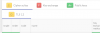
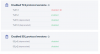
 , pointing at: external-IP:5001