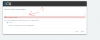
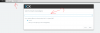
Can you please confirm that you have an active network interface with a valid IP address? Also if you have multiple interfaces try to disable them and start the installation from the beginning.
If you are part of a domain make sure that you install the system using the admin account to avoid any access issues. Also disable IPv6 if enabled on the network interface.
Also what network adaptor are you using? Have you tried installing on a different physical machine?
You could also try changing browsers to see if that helps. We haven't come across this issue before to be honest
first contact with 3CX, I made the installation in VM, it works perfectly, time after today, I made a session in a physical computer, that presented this problem., I will try again, I will follow these instructions.
Hi,
I had the same issue installing within an LXD container with Debian 9.
The configuration wizard would see the external ip address but fail to list network adapters as described.
The workaround was to configure using the cli option instead of the web interface.
The cli option only asked for manual entry of the local ip address and did not require selecting a network interface.
Just out of curiosity are you connected via WiFi or ethernet? It shouldn't matter (in terms of showing the adapters and IPs associated with them) but it might be worth looking into.