Sending SMS in Startup

Status
Not open for further replies.

mlindner

Free User
Joined
Aug 26, 2020
Messages
16
Reaction score
0
I am setting up sms for startup, and I have set up sms in the trunk and allowed sms in the user but I can not see anywhere to initiate an sms to send.

I am using Skyetel, and have set that end to sms, copied the webhook. I am assuming the SID is the SIP User ID from above and the API secret is the same as authentication password, but when I send a text from my cell phone, it thinks it was sent but it never shows up anywhere, and is not showing in the Skyetel call logs.
 
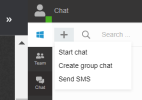
You can go to chats and click the + sign then Send SMS
1661170786435.png


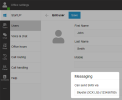
But before doing so, please edit your extension from Office Settings > Users and under Messaging ensure you select your trunk under the below option

1661170947737.png
 
I did finally find it in Chat, and enabled SMS. I can now receive but can not send. I do not see any error messages, the Skyetel SMS logs do not show any hint that a message is getting to them at all. I did try a few variations on the settings and routing options but no luck at all with sending.
 
In 3CX StartUP
  1. Log in to the 3CX Web Client, go to the Office Settings
  2. Navigate to “Voice & chat”, select “+ Add trunk”, choose your provider's country and select them from the drop-down list.
  3. Enter your main trunk number, SIP User ID, and Password.
  4. Check the “SMS” box and copy the webhook URL
  5. Navigate back to your provider's portal and paste the webhook as explained in the guides available in step 1.
  6. Obtain your API key from the provider's portal, paste it into the Web Client field and click “Save”.
For the Skyetel SMS integration to work you need to:
  1. Login to the Skyetel website.
  2. Go to “Phone numbers > Local” and edit the number you want to enable the SMS.
  3. Go to the “SMS/MMS” tab, from the drop down select “CallbackURL” and in the “URL” field paste the 3CX SMS Webhook URL
  4. Set the “Method” in “Post”, enable the “Delivery confirmations” and click save.

SMS Guide: https://www.3cx.com/docs/manual/sms-text/
Trunk Guide: https://www.3cx.com/docs/us-sip-trunk-skyetel/
 
I redid the settings to match the above, no change. Got a new API key just to make sure it was correct, Startup seems to think it is sending, but nothing gets to my cell phone and nothing shows up in the Skyetel SMS logs as having hit their system. I do not see any way to trace the outgoing in Startup.
 
I got the answer from Skyetel. Although I did not see it anywhere in any of the documentation you also need to set up yourself as a Tenant and also complete the SMS registration (for $60.00) to enable SMS to send. The registration is not unique due to regulatory issues, and can be found with other carriers also.
 
Ah ok, so the SMS feature was not yet activated on the provider end.
 
Not fully, it would receive but not send. The 3cx setup guide for Skyetel stops after setting up the trunk, the webhook and API, no mention of needing to set up the Tenant nor register, same with the Skyetel guide. What threw me off was the ability to receive but not send.
 
Not fully, it would receive but not send. The 3cx setup guide for Skyetel stops after setting up the trunk, the webhook and API, no mention of needing to set up the Tenant nor register, same with the Skyetel guide. What threw me off was the ability to receive but not send.
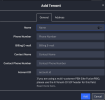
What do you enter for the Account ID for 3CX StartUP when you setup the tenant ? Is that the domain name (ie. 1234.3cx.cloud) ? Do we also need to setup Tenant users and associate an IP with the tenant ? Would that be the A record IP for the 3CX StartUP domain (ie. 1234.3cx.cloud).
 

Attachments

  • Screen Shot 2022-09-16 at 9.24.01 PM.png
    Screen Shot 2022-09-16 at 9.24.01 PM.png
    118.5 KB · Views: 18
I do not know what they are looking for for an account ID. I was testing to see what I could do with startup and I wanted to see how SMS worked. When I found out I had to go thru the registration process and pay another fee, I stopped testing. I may revisit in the future.

Try Skyetel support, they were very helpful with my question, but I did not get into the account ID area.
 
I’ve put in a ticket with them. I really don’t understand what is going on. In 3CX Startup, sometimes the SIP actually goes green and is registered with Skyetel. Then, I make an inbound call and everything works. About 20 seconds later, the SIP goes red again.
 
What do you enter for the Account ID for 3CX StartUP when you setup the tenant ? Is that the domain name (ie. 1234.3cx.cloud) ? Do we also need to setup Tenant users and associate an IP with the tenant ? Would that be the A record IP for the 3CX StartUP domain (ie. 1234.3cx.cloud).
That is something Skyetel will need to answer. Our guides after you create an account with the provider.

In 3CX Startup, sometimes the SIP actually goes green and is registered with Skyetel. Then, I make an inbound call and everything works. About 20 seconds later, the SIP goes red again.
Do calls stop working once the trunk goes red? Have you tried making inbound and outbound calls during that time?
Does it stay red for long?
 
Once it goes red, it stays red; cannot make inbound or outbound calls during that time. I’ve found that sometimes when I re-save the SIP credentials In Skyetel it goes back to green in 3CX Startup. But then, I make a call, it goes through, I hang up, and it goes red and this process repeats
 
@czcpf, have you contacted skyetel in regards to the issue?
 
This is a complete nightmare. The 3CX StartUp IP they assigned me is blacklisted on Skyetel. I have to go back and forth between two different support vendors. Can’t directly respond to 3CX support via email because they want you to use their support portal for all ticket communication. Can’t login to the support portal with my phone because I use safari browser and it just keeps redirecting.
 
This is a complete nightmare. The 3CX StartUp IP they assigned me is blacklisted on Skyetel. I have to go back and forth between two different support vendors. Can’t directly respond to 3CX support via email because they want you to use their support portal for all ticket communication. Can’t login to the support portal with my phone because I use safari browser and it just keeps redirecting.
I believe this has now been resolved, is this correct?
 
Hi,

Nope. The trunk was green. I made a call. It worked. About 2 minutes later the trunk is red again.
 
Hi,

Nope. The trunk was green. I made a call. It worked. About 2 minutes later the trunk is red again.

I believe you have a ticket open with us at tech support, can you reply back to the ticket so we can re check.
 
It is not a bad idea, but I think it needs some tweaks to make it very salable.
 
It is not a bad idea, but I think it needs some tweaks to make it very salable.
Thanks for the reply and comments, the product is still under testing phase, and is released as such for this purpose, in-order to iron out potential issues.
 
Status
Not open for further replies.

Members Online Now

Forum statistics

Threads
111,831
Messages
589,277
Members
164,660
Latest member
RJenkinsROCK