Solved Server Error on login

Status
Not open for further replies.

sanxion

Bronze Partner
Basic Certified
Joined
Feb 12, 2021
Messages
19
Reaction score
7
Hi, hope someone can help with this!

I have a Windows hosted v18 install that is on 18.0.1.214 and I need to install the latest update.

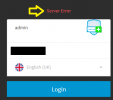
However when I log on to the Web Console I am getting "Server Error" appear in red after trying to authenticate.

I have tried restarting the services, the actual host server itself and tried in a fresh browser session In Private etc..

I would attempt a recovery but the latest backup is from January, and not sure on the chages since. For some reason the backup task has stopped since I upgraded from v16 to 18 earlier this year.

Anyone got any suggestions on how to either fix the server error or take a backup of the config without going to the web console?

Many thanks
 

Attachments

  • server error.png
    server error.png
    5.3 KB · Views: 25
  • Like
Reactions: ChrisC_3CX
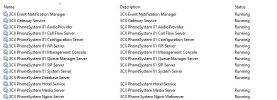
As @Saqqara said, I'd also recommend checking all services first. Make sure you see these services running:
1647431579603.png


If some are not running or keep stopping, the first thing I'd check is system resources and also disk space. You might also be able to get some more info from Windows Event Viewer.
 
Hi. Thank you for your suggestions and the list of services.

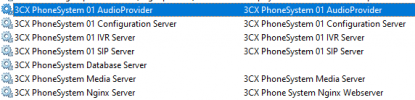
When you posted that I checked the services on this server and it is missing a load of services!

1647432647113.png

Not sure how this has happened. I have looked in Extended and Standard.

Can I run a repair from the installer and it will fix this instance or is it a backup / remove / reinstall.

I have upgraded a few other installs and no issues and also checked this after I did the upgrade and I did not see this issue and was able to get to the webconsole after the upgrade ran.

This is very odd!

Thanks
 
I checked the services on this server and it is missing a load of services!
Have you sorted services by name just to be sure?

Can I run a repair from the installer and it will fix this instance or is it a backup / remove / reinstall.
you will definitely have to re-install if services are missing.

I have upgraded a few other installs and no issues and also checked this after I did the upgrade and I did not see this issue and was able to get to the webconsole after the upgrade ran.
When you say you upgraded you mean you uninstalled 3CX v16 and installed 3CX v18 or did you perhaps attempt to run the v18 installation while v16 was already installed?
 
Also thank you for the tip on the Backup command. I have been able to run a full backup. So hopefully if I do need to uninstall and reinstall, I can just do that and recover from the backup.

I do have the pre v18 backup as well if I need to recover to that.

Thanks
 
Have you sorted services by name just to be sure?


you will definitely have to re-install if services are missing.


When you say you upgraded you mean you uninstalled 3CX v16 and installed 3CX v18 or did you perhaps attempt to run the v18 installation while v16 was already installed?
Yes, sorry. To be clear, backup v16, uninstall v16, install v18, setup v18 from backup.
 
  • Like
Reactions: ChrisC_3CX
Yes, sorry. To be clear, backup v16, uninstall v16, install v18, setup v18 from backup.
In that case everything should've been fine, so, if services are in fact missing, you will have to re-install and I think that you should definitely do so especially since you also have a backup. What might 've caused this may even be antivirus software so I strongly recommend you uninstall av software from this host if any exists before uninstalling and re-installing 3CX.
 
In that case everything should've been fine, so, if services are in fact missing, you will have to re-install and I think that you should definitely do so especially since you also have a backup. What might 've caused this may even be antivirus software so I strongly recommend you uninstall av software from this host if any exists before uninstalling and re-installing 3CX.
Hi

Yes, I have checked the services two or three times and also got someone else to check it just in case it was my eyesight!

I also compaired it to one of our other customers who I did the v16 to v18 install process and theirs has all the correct services.

I will uninstall the AV for the period of time that I am carrying out the reinstall. I will get this done out of hours so the customer has no downtime today. I will update tomorrow on the progress.

Thank you all for the help.
 
  • Like
Reactions: ChrisC_3CX
Hi

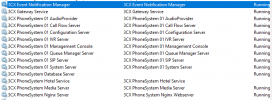
Just to say that the backup, uninstall, install, recovery from backup worked all ok.

1647463019220.png

All services present and correct!

Thanks
 
  • Like
Reactions: ChrisC_3CX
Excellent news!

Glad to see this all got sorted in the end! Don't hesitate to post anew should you need anything else!
 
Status
Not open for further replies.