Setting up a new desk phone.

Hayward-i1

SOHO User
Joined
Oct 4, 2023
Messages
61
Reaction score
16
I thought this would be one of the simplest things I needed to do.

I have a new desk phone, it needs manually configuring to a registered extension.

I create the user on 2CX V20.... No where to enter the password so I can configure the desk phone. .. Sure I can scan a QR code which is pretty useless and I can reset the password, but I can not see what the reset password is or choose it.....

What have I missed?
 
It's very straight forward to provision a phone. Have you got an SBC? What phone is it.
 
Thank you for getting back quickly. No, no SBC. Just a simply installation and used to quickly entering the registration details into the Phone, it registers and don't look back again, worked this way for years including V18.

Do not understand why someone would take away the ability to enter or at the very least view the registration password....
 
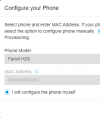
You need to select "i will configure the phone myself" when adding a phone.

1730116887620.png
 
Thank you, but I can't find that anywhere.... In "users", there is no option and under phone the extension does not appear and there is no option to "Add phone".... I am suspecting I may be a little out of date (I have been using 3cx since Version 9......)
 
Thank you to those that responded. When Alphabetic posted the image of what looked like the ability to configure the phone manually, I started pondering.

I eventually found the option and it worked. I have now manually configured the phone in question.

The biggest problem for me though is that I have been using 3cx since V9 (maybe longer, but I can trace back my usage to V9) and it seems I need to update myself :)
 

Forum statistics

Threads
111,955
Messages
589,926
Members
164,858
Latest member
MichaelRussell3