"Settings" misses parameters dialog

Status
Not open for further replies.

oliverhamburg

Joined
May 29, 2018
Messages
16
Reaction score
0
Since the last major update the settings dialog does not hold some entries anymore.

The thing I miss most is the "Custom Parameters" dialog. In the past it was available via

3CX Management Console > Settings > Parameters

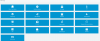
This is what's left at 3CX Management Console > Settings
upload_2018-6-1_11-31-50.png

No Parameters :(
 

Attachments

  • upload_2018-6-1_11-24-35.png
    upload_2018-6-1_11-24-35.png
    29 KB · Views: 5
How did you login to ManagementConsole? using extension credentials or administrator credentials? If you will login as administrator of PBX - parameters should be there.
 
Hi, I logon via https://ourcompany.3cx.de/#/app/

User is "admin", the user we've got with the welcome message when the virtual machine has been created. We did not create additional users, despite of the Extensions.

It looks like "admin" is still Administrator since granting "Allow access to 3CX Management Console" rights to an extension is still possible.
 
Loging in with the credentials of the Extension with granted "Allow access to 3CX Management Console" rights I still do not get the parameters dialog
 
Extension with "administrator" rights is not the same as administrator of PBX. After you install 3CX PhoneSystem, installation wizard asked you for administrator user and password. Use this credentials to login.
 
  • Like
Reactions: Arash Faravar
Well, I am using exactly the credentials I have got with the "Your PBX is ready" email.
The user "admin" and a password. Using these credentials logging in is denied.

Which is fine, since we have altered the password. Logging in with our password and the above user I get into the management console.

However I am getting this limited interface.

As far as I can tell, this happens after the last major update.
 
there is not Extension "admin" by the way

I am e.g. having the possibility to backup and restore. So I suppose I seem to be working with administration rights.
 
Welcome mail:
upload_2018-6-1_13-22-11.png

Logged in:
upload_2018-6-1_13-23-48.png

Both is "admin". So I am the Administrator but not getting this Parameter dialog
 
Hello, yes, this is a free PBX express installation.

The user I am talking about is the one "coming" with the initial mail. For some reason, he i.e. "admin" seems to have lost the "Hosting Admin" role.
 
Please note that the admin and the hosting admin are 2 different accounts. One cannot see the other ones options. So the user of the free PBX installation will not have these options available.
As the PBX is hosted in our accounts we serve as the hosting admin.
 
I see. So this hosting admin is out of my scope.

However in the past I could address this Parameters Dialog. Thus it looks like this hosting admin is not the sole one beeing able to get into this dialog.

What can we do to get into this Parameters Dialog using the standard admin we have in our control?
 
However in the past I could address this Parameters Dialog. Thus it looks like this hosting admin is not the sole one beeing able to get into this dialog.

What can we do to get into this Parameters Dialog using the standard admin we have in our control?
The hosting admin was introduced a few versions ago. Previous to that all settings were available to the PBX admin probably that is why you remember having the option. Since the introduction of the hosting admin you no longer have access to these settings.
If access is required you will need to install the PBX in your own cloud instance where you can have full control of the PBX and the OS.
 
  • Like
Reactions: oliverhamburg
Okay, this seems to be the actual answer, thank you!

Is there a procedure on how to move a 3CX installation from the cloud to a self hosted installation?
 
You can create a backup of the current installation and once you install the PBX on your own hosted instance you can restore the backup.
Make sure that the backup does not contain licence and FQDN information.
Please note that the original installation will have to be deleted as you cannot have 2 instances running the same licence and FQDN. As you cannot delete a 3CX free instance we will have to do that for you. Send me a p.m. once you need the instance deleted so we can delete it for you.
 
The installation done on our server, what kind of license does I start with? Or is it possible to make an initial installation without a license?
 
You can start with the same free licence which is standard 16 simultaneous calls. Every free key has the same feature set.
 
Status
Not open for further replies.

Latest Posts

Forum statistics

Threads
111,885
Messages
589,547
Members
164,745
Latest member
Herm77