Setup Outbound Rule

Status
Not open for further replies.

rsatj

Free User
Joined
Sep 20, 2021
Messages
26
Reaction score
4
I am trying to set up outbound rules for International destinations as follows - The customer will Select 00 as an International Access followed by the International Number including Country the 3CX Server will 00xxxxxxxx from the customer remove 00 and then add 2222xxxxxxxxxxxxxx before sending it to the SIP Trunk e.g. to call a destination mobile 9924851 in Fiji the caller will press 006799924851, 3CX needs to remove 00 and replace it with 2222 the number is now modified to 22226799924851 and sent to the SIP trunk

Need some assistance in setting up the outbound rule
 
Have done the changes still no luck am awaiting feedback.
 
Ask the provider what it is they expect to see exactly so we can avoid the guessing work. Perhaps they can provide an example of an Invite as they want to receive it. Once we have that we can suggest what changes need to be made more accurately.
 
Hi Yiannish,
Looks like we are sending the LAN IP as the originating IP instead of the WAN IP
1632871189755.png

 
Looks like we are sending the LAN IP as the originating IP instead of the WAN IP
If you are running the capture on the PBX machine then it is normal to see your local IP as the originating IP as the capture is running on the local NIC of the machine. Are you running the capture on the PBX machine or somewhere else?
 
Hi Yiannish,
That does make sense, the capture is running on the 3CX machine so logically the Originating IP would be the local IP. Let me see what they see at the receiving end.
 
  • Like
Reactions: YiannisH_3CX
Dear Mr.Rsatj,

Kindly try this & remember that for each total dialing digits (10/12/16/20...etc) you have to make separate outbound rules.

DISABLED SRTP & set Transport Protocol as ANY, then try below outbound rule, if successful then try to change SRTP & Transport protocol but be sure that your SIP really authorized/work on this.


For Outbound calls, you should make the Outbound rules simply then it would work, as you made it already so here I'm re-writing which maybe re-gain you if you missed something:-
1. Calls to numbers starting with prefix
- 00

2. Calls from extension(s) - MENTION THE EXTENSION OR if more then add with comma BUT NO SPACE

3. Calls to Numbers with a length of - EXACT LENGTH, IF MOBILE NUMBER IS "0091 0123456789" = 14DIGITS SO MUST MENTION 14, IF DIALING LANDLINE NUMBER OR ANY OTHER COUNTRY WHICH MAYBE 12 OR 16 OR MORE THEN MAKE A SEPARATE OUTBOUND RULE FOR EACH AS one rule for one type of dialing. Each Outbound rule will auto-detect, don't worry.

4. Calls from extension group(s) -
leave it OR if you made DEFAULT group & Want to give the access to all then add the same group.

5. Make outbound calls on - In the Route 1 choose SIP name then choose 0 in Strip Digits, leave Prepend blank, choose Outbound Caller ID

Dial like this 00910123456789 where 00 triggers the OUTBOUND RULE & as an International call + total 14digit trigger the exact length for this rule.

Save it & try...

B.regd
Mayank Gupta
 
Dear Mr.Rsatj,

Kindly try this & remember that for each total dialing digits (10/12/16/20...etc) you have to make separate outbound rules.

DISABLED SRTP & set Transport Protocol as ANY, then try below outbound rule, if successful then try to change SRTP & Transport protocol but be sure that your SIP really authorized/work on this.


For Outbound calls, you should make the Outbound rules simply then it would work, as you made it already so here I'm re-writing which maybe re-gain you if you missed something:-
1. Calls to numbers starting with prefix
- 00

2. Calls from extension(s) - MENTION THE EXTENSION OR if more then add with comma BUT NO SPACE

3. Calls to Numbers with a length of - EXACT LENGTH, IF MOBILE NUMBER IS "0091 0123456789" = 14DIGITS SO MUST MENTION 14, IF DIALING LANDLINE NUMBER OR ANY OTHER COUNTRY WHICH MAYBE 12 OR 16 OR MORE THEN MAKE A SEPARATE OUTBOUND RULE FOR EACH AS one rule for one type of dialing. Each Outbound rule will auto-detect, don't worry.

4. Calls from extension group(s) -
leave it OR if you made DEFAULT group & Want to give the access to all then add the same group.

5. Make outbound calls on - In the Route 1 choose SIP name then choose 0 in Strip Digits, leave Prepend blank, choose Outbound Caller ID

Dial like this 00910123456789 where 00 triggers the OUTBOUND RULE & as an International call + total 14digit trigger the exact length for this rule.

Save it & try...

B.regd
Mayank Gupta
Hi Mayank
1. Where do I "DISABLE SRTP" ?
2. if the customer has to dial 006799924851 and the Carrier expects 3CX to strip 00 and 2222 to the
meaning that 3CX will be sending 22226799924851 how many digits does the rule apply to 12 or 14 ?
 
  • Like
Reactions: Mayank143
In that case it would be 12, the total digits that "are sent to" the outbound rules to be matched. Everything after that, adding or removing digits, no longer has anything to do, with the criteria, for making a match
 
Hi Mayank
1. Where do I "DISABLE SRTP" ?
2. if the customer has to dial 006799924851 and the Carrier expects 3CX to strip 00 and 2222 to the
meaning that 3CX will be sending 22226799924851 how many digits does the rule apply to 12 or 14 ?

Dear Mr.Rsatj,

10x 4 ur reply.

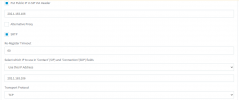
1. Go to SIP TRUNK edit page:-
Click 4th TAB Option
Go to 2nd column Advanced - there you can see SRTP MODE.... Re-Register Timeout.... Select which IP to use.... Transport Protocol etc.

1633587790868.jpeg1633587790868.jpeg see enclosed screenshot.


If your SIP provider is also accepting SRTP + TLS then you must try to disable & try, if works then re-enable.


2. Kindly understand that STRIP doesn't mean to ADD, it stands to REMOVE. Carrier never expects anything from 3cx OR any provider. They need the exact dialing format to connect. For PBX they said BUT dialing from PBX is your part as CARRIER accepts the simple / ROUTES format of dialing which they told you.

Example:-
You added Calls to numbers starting with prefix - 002222
Numbers length - 14
Strip Digits - 4 (remove 1st 4digits)

Once you dialed 002222 1234567890, then 002222 will trigger the rule as International Outbound call BUT then manipulation starts:-
a. As you stated Length-14digits & Strip - 4digits
b.
Then 002222 1234567890 became after STRIP (remove 1st 4digits) 22 1234567890
c.
Mentioned Length - 14digits so 22 1234567890 would be 12digits BUT need 14digits to trigger.

Does your CARRIER accepts International calls with 2222 instead of 00?

I am using SIP calling almost 19years & few of them have 3types of dial calling ROUTES:-
Route Grey -
To use this calling route then dial like this 00001 67 1234567890
Route Standard -
To use this calling route then dial like this 0067 1234567890
Route Premium -
To use this calling route then dial like this 00000 67 1234567890
****Above just an example of dialing format****


You have to make various OUTBOUND RULE as per the route & give them exact dialing digits but DO NOT USE STRIP as it would create the manipulation of total LENGHT of the DIGIT which need to accept as outbound call.

Example - Route Grey - 00001 67 1234567890:-
00001 67 = 7digits + mobile number digits = final digits so make it 1st rule.
00001 67 = 7digits + landline number digits = final digits so make it 2nd rule.

If area code are +/- like 00001 67 xxx 12345678 OR 00001 67 xx 12345678 then make the digits accordingly.

B.regd
Mayank Gupta
 
Last edited:
Am in the process of testing again will revert again once completed
 
Call Failed as per attached text file SIP Trunk Option field shown below
1633734355637.png1633734355637.png
 

Attachments

Hello @rsatj ,

I think you may not be fully understanding how everything works exactly and what these settings do. This is not bad, it can be quite complicated, but to make your life easier, I think you should consider finding a 3CX Partner and come to some arrangement to help you with your setup.

From the settings in the screenshot and the logs, I can tell you that probably, the transport of your SIP Trunk provider is NOT TCP, you will probably need to switch that to UDP.

Also as @Mayank143 very correctly said, I think you should switch SRTP Mode to "Disabled", unless you know exactly what you are doing.
 
Status
Not open for further replies.

Forum statistics

Threads
111,993
Messages
590,175
Members
164,931
Latest member
admintest