Setup Outbound Rule

Status
Not open for further replies.

rsatj

Free User
Joined
Sep 20, 2021
Messages
26
Reaction score
4
I am trying to set up outbound rules for International destinations as follows - The customer will Select 00 as an International Access followed by the International Number including Country the 3CX Server will 00xxxxxxxx from the customer remove 00 and then add 2222xxxxxxxxxxxxxx before sending it to the SIP Trunk e.g. to call a destination mobile 9924851 in Fiji the caller will press 006799924851, 3CX needs to remove 00 and replace it with 2222 the number is now modified to 22226799924851 and sent to the SIP trunk

Need some assistance in setting up the outbound rule
 
  • Like
Reactions: ChrisC_3CX
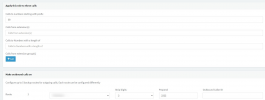
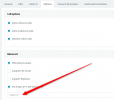
What Saqqara mentioned will look something like this:
1632142266765.png


You can of course add more conditions to the rule such as Extensions, Digit Length, etc to further restrict what calls get matched.
 
I have done that previously but got a call failed message can we extract or view logs I am sure that this capability was there in previous versions. At the moment I need to extract some Call Flow information to find out what is happening.
 
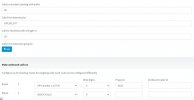
I have attached log files and the outbound rule that applies to the destination, in this case a test call was made from extn 107 to 006799924851
 

Attachments

The number(s) you are dialing , when you don't add a #, are 12 digits long. You have specified that the numbers are 18 digits long.
 
  • Like
Reactions: ChrisC_3CX
I think leejor is on point.

Just a side note, based off the log there seem to be some malicious attempts to your PBX so you might want to add those IPs to the blacklist if they haven't automatically been added already.
 
The number(s) you are dialing , when you don't add a #, are 12 digits long. You have specified that the numbers are 18 digits long.
Hi leejor,
Have changed this to 12 and tested still getting call failure
 
Make sure that the Outbound Rule is on the top so it is checked first. If the issue persists, go into "Dashboard >> Activity Log >> Settings" and enable Verbose Logging. Make the same call and when it fails, go into "Dashboard >> Activity Log", use the "filter" button to display the logs involving the last call and have a look at them for any clues.
 
Remove the length, as this will allow any length of number

You have already specified calls starting with 00 coming from extension 100,101,107

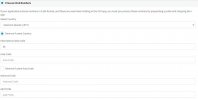
Check your E164 settings under Settings
 
Make sure that the Outbound Rule is on the top so it is checked first. If the issue persists, go into "Dashboard >> Activity Log >> Settings" and enable Verbose Logging. Make the same call and when it fails, go into "Dashboard >> Activity Log", use the "filter" button to display the logs involving the last call and have a look at them for any clues.
Bula Chris log entries for call attached
Remove the length, as this will allow any length of number

You have already specified calls starting with 00 coming from extension 100,101,107

Check your E164 settings under Settings
Bula Saqqara current E164 settings attached
 

Attachments

So, the call is now following the outbound rule. However, there appears to be another issue when the call is sent out on the trunk. What type of SIP trunk is this? What is the reason for prefixing with 2222? Have any calls over this trunk worked?

09/22/2021 8:04:00 AM - Call to T:Line:10001>>22226799924851@[Dev:sip:[email protected]:5060;transport=TCP] from L:75.1[Extn:107] failed, cause: Cause: 503 Transport failure: no transports left to try/INVITE from local
09/22/2021 8:03:57 AM - [CM503025]: Call(C:75): Calling T:Line:10001>>22226799924851@[Dev:sip:[email protected]:5060;transport=TCP] for L:75.1[Extn:107]
 
So, the call is now following the outbound rule. However, there appears to be another issue when the call is sent out on the trunk. What type of SIP trunk is this? What is the reason for prefixing with 2222? Have any calls over this trunk worked?

09/22/2021 8:04:00 AM - Call to T:Line:10001>>22226799924851@[Dev:sip:[email protected]:5060;transport=TCP] from L:75.1[Extn:107] failed, cause: Cause: 503 Transport failure: no transports left to try/INVITE from local
09/22/2021 8:03:57 AM - [CM503025]: Call(C:75): Calling T:Line:10001>>22226799924851@[Dev:sip:[email protected]:5060;transport=TCP] for L:75.1[Extn:107]
Will check with the provider
 
Check with them, but are you sure your Provider allows connections over TCP?
The safest bet would be to edit your SIP Trunk settings and in the Options tab, in the "Transport Protocol" drop-down, select UDP and press OK. This way you force UDP.
 
Check with them, but are you sure your Provider allows connections over TCP?
The safest bet would be to edit your SIP Trunk settings and in the Options tab, in the "Transport Protocol" drop-down, select UDP and press OK. This way you force UDP.
Check with them, but are you sure your Provider allows connections over TCP?
The safest bet would be to edit your SIP Trunk settings and in the Options tab, in the "Transport Protocol" drop-down, select UDP and press OK. This way you force UDP.
Bula NickD Apologies for the late response I have supplied the pcap files to SIP Trunk provider and am awaiting their feedback
 
  • Like
Reactions: ChrisC_3CX
Good to hear but, have you not also tried switching the transport method as @NickD_3CX suggested?

You can do this from "SIP Trunks >> Edit >> Options >> Transport Protocol", select UDP and click OK on the top then give it another go.
 
Good to hear but, have you not also tried switching the transport method as @NickD_3CX suggested?

You can do this from "SIP Trunks >> Edit >> Options >> Transport Protocol", select UDP and click OK on the top then give it another go.
Bula ChrisC have done that call gets through but there is no speech path calling extension does not hear ringtone while called number is ringing and when call is answered no audio/speech path between both parties
 
Bula ChrisC have done that call gets through but there is no speech path calling extension does not hear ringtone while called number is ringing and when call is answered no audio/speech path between both parties
At least that means the call went through. The fact that there is no audio may be a different problem entirely. Can this 3CX PBX completely pass the firewall test in "Dashboard >> Firewall"?

Also, what SIP Provider are you using, does it happen to be a 3CX Supported SIP Provider?
 
  • Like
Reactions: leejor
At least that means the call went through. The fact that there is no audio may be a different problem entirely. Can this 3CX PBX completely pass the firewall test in "Dashboard >> Firewall"?

Also, what SIP Provider are you using, does it happen to be a 3CX Supported SIP Provider?
Hi ChrisC
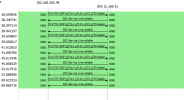
According to the Provider's Engineers we are sending the internal IP as originating IP and not the Public IP thus the call failure1632430344817.png
 
By default, 3CX sends the Public IP in all SIP fields, except the 'Via' header. There 3CX by default sends the IP of the NIC 3CX is sending the package out of, which technically isn't wrong, but some providers require that the Public IP be present there as well.

If indeed they are referring to the 'Via' header, just edit the SIP Trunk settings, go to the "Options" tab, and here check the "Put Public IP in SIP VIA Header" and put your Public IP Address there, then just press OK:
1632475603557.png

If this still doesn't resolve the problem, if they could be a bit more specific in which SIP Field they require what, we could advise further.

You could even make a packet capture yourself, just start the capture from Dashboard --> Activity log, make a call attempt, then stop the capture, open it in wireshark, find the INVITE message, expand it, and check what is sending exactly.
 
Status
Not open for further replies.

Forum statistics

Threads
111,994
Messages
590,183
Members
164,934
Latest member
bunthoeun.may