SF Integration Issue - sObject type not supported

Status
Not open for further replies.

Russell1980

Free User
Joined
Jul 17, 2023
Messages
4
Reaction score
0
Hi,

I've been looking to switch the user authorised for the Salesforce Integration but after trying to change the user I get an error when I run the test. The error message is below - it appears that the integration is able to connect to Salesforce but unable to make a query:

Server returned a non successful status code - HTTPStatusCode=BadRequest - Reason=Bad Request - Content=[{"message":"sObject type 'contact' is not supported. If you are attempting to use a custom object, be sure to append the '__c' after the entity name. Please reference your WSDL or the describe call for the appropriate names.","errorCode":"INVALID_TYPE"}]

I authorised the App with a System Admin user that has the View and Modify All permissions so I'm unsure why I'm getting this error. Can you point me in the right direction to resolve this?

Thanks
Russell
 
Hello Russell,

Looks like the user doesn't have access to the contacts entity. This is why Salesforce is rejecting the API call due to it being related to an unknown entity. The contacts entity is standard, not a custom entity, so it should work if permissions are properly set. Also, are you using a Salesforce account with Person Accounts by any chance? That version of Salesforce is not supported.
 
Hi @edossantos,

As I mentioned, I used my user account and as an Admin I have access to all Objects. I can create view all and create Contacts via the user interface so it doesn't make sense that I shouldn't be able to do so via the API. I can confirm that we're using a version of Salesforce without Person Accounts.

Is there anything else I can try to resolve this?

Many thanks
Russell
 
When you create the app in Salesforce as described here, did you specify all those requested permissions? Even if you authorize with a user having full permissions, if the app you create doesn't request the access to contacts, then these will not be visible.
 
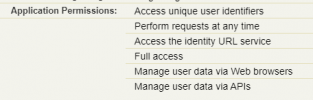
Some of the permissions aren't options in the multi select picklist when setting up the Connected App - this was working until I tried to switch the user authorised for the integration. The permissions this app had are listed below (i've listed what the documentation lists below first and then the permission I applied):

  • Access and manage your data (api) = Manage user data via APIs (api)
  • Access your basic information = Access the identity URL service (id, profile, email, address, phone)
  • Access to your unique identifier (openid) = Access unique user identifiers (openid)
  • Full Access = Full access (full)
  • Perform requests on your behalf at any time = Perform requests at any time (refresh_token, offline_access)
  • Provide access to your data via the Web = Manage user data via Web browsers (web)

Does the above mapping look OK?
 
Yes, looks good, this is how it looks in my testing environment, and works:
1689609263693.png

this was working until I tried to switch the user authorised for the integration.
Do you mean that you had another user granting the authorization, which worked well, and now you're switching to a new user and have problems? And this user is the account admin?
 
Yes - that's correct. I went into the 3CX Management Console, pressed the Authorize button entered new user details, granted access, checked the refresh token updated and then tried testing. The new user is an Account Admin (same profile and permission sets as the previous user).
 
Status
Not open for further replies.

Forum statistics

Threads
112,147
Messages
590,961
Members
165,167
Latest member
Finatra.us