Solved Share screen is very small

Status
Not open for further replies.

mmarks9156

Titanium Partner
Joined
Nov 19, 2020
Messages
13
Reaction score
1
We recently started using 3CX Web conferencing in place of Zoom and noticed when sharing screen the size is very small and almost unreadable. Is there a setting that needs to be configured to allow for full screen sharing? TIA
 
Person who do screen sharing can reduce windows display screen resolution to larger resolution or increase size of test to 150% above so participants in 3CX web conferencing are able to watch and read it.
 
I'm not sure what you mean. I did try increasing Windows display by 175% resolution but no change to shared screen. Can you provide more info on this? I'm surprised not more people have brought up this concern using screen share.
 
To get a better idea here, what resolution are you (the presenter) using on your screen, and what resolution and device are the participants using to watch the presentation and they see your screen very small?
 
My resolution is set to 2460x1440 on 27" monitor. I am unsure what the resolution is on the participants end since there are various attendees.
 
Are you referring to what you as the presenter sees or the participant?

Are you sharing your screen in an RDP session?

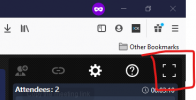
Participant cap either make fullscreen

1614876263001.png

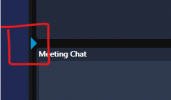
or hide the chat

1614876291718.png
 
This is what the participants see. Yes by minimizing the Meeting Chat window that helps.
 
Can you replicate the issue yourself?
 
Yes. I was able to resolve by lowering my resolution to 1920x1080. Does 3CX support the higher resolution?
 
  • Like
Reactions: NickD_3CX
Status
Not open for further replies.

Latest Posts

Members Online Now

Forum statistics

Threads
111,845
Messages
589,333
Members
164,681
Latest member
JV J