- Joined
- Oct 12, 2020
- Messages
- 263
- Reaction score
- 29
Since the new UI changes, when I do screen sharing with clients, It is almost impossible to see whats going on. Both myself and all endpoints at the location use 1920x1080 resolution. I feel like the new added menu bars and windows set in windows take up valuable screen real estate that could be used for the video feed. I did check the link below but since everyone has the same resolution as I do, I dont think thats the issue.
https://www.3cx.com/community/threads/share-screen-is-very-small.80051/
This is what I see. I have to pinch and zoom on my laptop to make it useable. Is there any way to make this bigger natively? Happens on every session. Also, I have mouse control, but no ability to use my keyboard. How do I get that control again?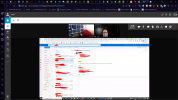
https://www.3cx.com/community/threads/share-screen-is-very-small.80051/
This is what I see. I have to pinch and zoom on my laptop to make it useable. Is there any way to make this bigger natively? Happens on every session. Also, I have mouse control, but no ability to use my keyboard. How do I get that control again?