SharePoint Sync - Storage error Unable to access the directory. Check connection, configuration, credentials, private key, or directory path

Ron13

Bronze Partner
Advanced Certified
Joined
Mar 11, 2025
Messages
2
Reaction score
1
Hello,

I have been getting this error when trying to configure the storage to SharePoint, I have already Re-synced the MS365 Intergration with global admin credentials.
I had read in one of the threads that the root site needs to be a communication site and not a team site.

For this client the root site is actually a team site on SharePoint. Is there a way to resolve this?

Apart from this I don't see any issues with the configuration, but I will be happy to review any other suggestions that come.
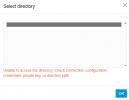
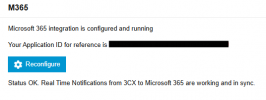
1742251012508.png1742251122761.png

Regards,
Ron13
 
  • Like
Reactions: Albert-Jansen
We also see this problem on our PBX
 
I experienced the same error. I attempted to reconfigure the integration, but it did not resolve the issue.
 
We experieced the same error on version: 20.0.6.700

I created a new folder in the root sharepoint site document library. Based on the information here:
https://www.3cx.com/docs/manual/sharepoint/

We performed a reconfiguration of the integration, which first resulted in a error stating that the M365/Entra app id already exists. But later we tried again and it worked! Additionally, we noticed it added the permission to the 3CX app in Entra:

Files.ReadWrite.All - Read and write files in all site collections


Then we were able to add the folder in the root sharepoint domains document library to 3CX.
 
We experieced the same error on version: 20.0.6.700

I created a new folder in the root sharepoint site document library. Based on the information here:
https://www.3cx.com/docs/manual/sharepoint/

We performed a reconfiguration of the integration, which first resulted in a error stating that the M365/Entra app id already exists. But later we tried again and it worked! Additionally, we noticed it added the permission to the 3CX app in Entra:

Files.ReadWrite.All - Read and write files in all site collections


Then we were able to add the folder in the root sharepoint domains document library to 3CX.
Thanks for sharing your info, we also did perform a reconfig of the integration and did not get any errors, I have also double check the app permissions as below. Still getting the same error!

1751432386724.png
 

Forum statistics

Threads
111,815
Messages
589,138
Members
164,631
Latest member
OBMTC-Admin
