Show QUEUE or EXTENSION and customer info when CHAT STARTS

Status
Not open for further replies.

jerry@center5

Customer
Joined
Apr 30, 2015
Messages
24
Reaction score
7
The 3cx CHAT feature to integrate on website is great. We have it set to ask for NAME & EMAIL address.

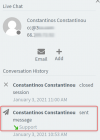
However, when a chat starts we have No way of known the Queue Name or there NAME or EMAIL. I did notice you can dig down to fine the name and email but when mobile its a waste. Plus its helpful to have this info when returning to a chat etc.

It would be helpful if the CHAT started out on our end as:

Web Chat visitor for: Sales
Visitor Name: John Doe
Visitor EMail: [email protected]

then chat appears here.......
 
Hello Jerry,

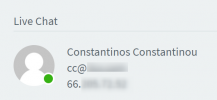
The information like name, email and queue initiated of the chat are available on WebClient > Chat > click on three vertical dots > Information. Can you please verify that this is the case?
What update is your PBX ?
1609664633644.png
 

Attachments

  • 1609664444751.png
    1609664444751.png
    22.8 KB · Views: 1
In my case, I'm using IOS version (16.1.7.19) and I don't see three dots. 3CX version: 16.0.1078

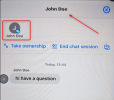
The 3cx app on IOS I'm using, I click on the Chat, then click the NAME or Number at the very top then it gives me a circle with the contact, a Transfer, Dealt with and Archive options.

I click on the Circle and it shows me a contact, none of the data the customer keyed such as:
Web Chat visitor for: Sales
Visitor Name: John Doe
Visitor EMail: [email protected]


It is a LOT of selections to get what I believe should be show the second we bring up the chat. Other chat products we've use that ask visitors questions show the question and answers at the beginning of the chat.

Thanks for considering and if I'm doing something wrong please let me know, maybe I'm missing something.
 
Hi Jerry,

I checked this on the latest version of the PBX + Wordpress plugin + iOS App and you can get the Name and Email that the user typed in.

The Name is immediately present when both in the PUSH message and once you open the chat:
1610365782035.png

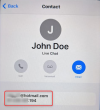
By pressing on the name, it appears as a Contact that you can then press on to also see the email they filled in, as well as the IP that the sent from:
1610365849478.png

Indeed the Queue is not visible here, but for agents serving multiple Queues to the point where it can be confusing, I think they should consider being at a desk with their WebClient open.
 
  • Like
Reactions: Evolute IT
Having the Queue is critical to the ability to properly communicate and would be extremely helpful. Maybe simply add it in brackets after the name on the top line, so we don't have to click to find it would be great.

On the web client, we live on mobile devices so that doesn't work regardless.

Thanks for the quick response.
 
Status
Not open for further replies.

Forum statistics

Threads
112,148
Messages
590,963
Members
165,169
Latest member
Isaac415