Simple CFD Script

Dan - EAC

Silver Partner
Basic Certified
Joined
May 16, 2024
Messages
8
Reaction score
7
Hi,

It's my first time using CFD so I assume I am doing something wrong. I am trying to create a simple script that does the following:

When Option 2 is pressed on the IVR for example, play an "un-skippable" voice prompt and then transfer the call to an external number.

I was previously achieving this with a "dummy" extension with the external number set in the mobile field but this appears to make a conference call and stops DTMF from processing ( the external number hits a 3rd party IVR).

Anywho, I have the following setup in the CFD:
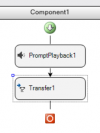
1752586102137.png

I've set the prompt playback to play the message with the "Accept DTMF Input During Prompt" unchecked.
Followed by a Transfer to the external number which is specified within speech marks.

When building the script, it asks the following:
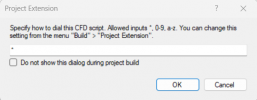
1752586203008.png
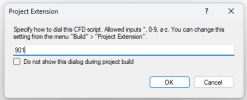
Which I assume I would set to "2" in this scenario
So it builds fine. I am using a hosted instance of 3CX v20 so I head over to the Integration section.

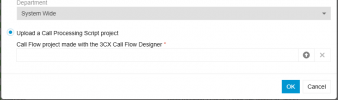
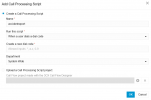
I think the part that needs clarifying is here:
1752586949056.png
The dial code is a required field.. so would I also set this to 2? In my IVR, I point option 2 to reach the call processing script but it to me it seems like it would be hitting a double 2? anywho when testing this it doesn't seem to work.

In my tests I when pressing option 2, see the "caller ID" section changes to the name of the script but the call drops immediately.

Any pointers would be appreciated.

Thanks in advance.
 
Which I assume I would set to "2" in this scenario
No, this must be an extension number, for example 200 or 2000, depending on your system configuration (extension length). Then, in your IVR you route the call to that extension.
 
Hello Dan - EAC,

Just like edossantos_sipcaller, mentioned, just enter an internal extension number to be used for the CFD.

1752587697532.png

When you want to import, use the "Upload" function.
1752587762234.png

This should work for you.

Paulo
 
Many thanks for this to both of you. I've amended my test script and it is now dialing!
 
Sorry to add to this but I may have celebrated slightly too early :oops:.

The IVR now dials the script fine. I set one of the options to select the script and that part is fine. It seems that the transfer to the external number doesn't seem to be happening. What I thought was the case... i noticed that on CFD when you create a transfer the maximum delay you can set is 2000ms.. I was thinking maybe.. that the call was performing the transfer whilst the prompt was being played. The prompt plays for around 33 seconds however the external IVR does play out for around 68.. so I should of heard the end of it.. but it seems like the call just drops.

Is the "Transfer" the right option to use and is there anything else needed?

I've made reassuring Outbound rules and ensured E164 Processing is enabled. Tried both with 0*** as well as +44***
 
Hello,

The guys above might give you better guidance, but you could try Transfering to a local extension and configure the forwarding to mobile there.

Best,
KS.
 
Hello Dan - EAC,

The transfer to external number from the CFD is a 'Blind Tranfer'.
There is nothing special about it.
Enter the number just like you would dial on the phone to reach te external number (mobile phone).

However there is something to take care about, the number you send out as being your own number.
Normally when you use an extension it does use the "Outbound Caller ID" from the extension used.

When you use the Call Transfer from the CFD is does not have this setup, so the Call will try to go out with the Callers number (not your own number).
This can end up in the call failing, as your own provider will not accept this, or it will send out some wrog number, again not being your own number.

Therefor it is best to use an extension in the call transfer to external number, can you try this?
This is also easy to change the external number, so you do not have to modify the CFD.

Paulo
 
Last edited:
Thanks for the response. I'll do a bit of testing and then update. I did test with our own number and had the same result but will test with an extension/forward/mobile

The blind transfer + calling out with the caller number is actually what I would prefer to happen. It's a bit of a middle-man scenario.
The call reaches our customers PBX IVR. One of the options dials out and is passed on to a 3rd party company which actually deals with the issue. The 3rd party company has provided our customer with a DDI which goes to an IVR setup for this purpose.

Don't want to get too the actual issue as I feel this like it would go out of the realm of this post and forum etiquette ;).. but might give a little insight and other suggestions:

I did get around this with a dummy extension (no soft phone or device) which had a mobile number set
Extension was set to dial the mobile number as well as the extension.
This does work however the endpoint.. (DID provided by the 3rd party) hits an IVR.
It seems when dialing an extension which is set to dial the mobile number as well.. 3CX treats this call as a conference of sorts and doesn't send DTMF inputs through resulting in the caller not being able to interact with the 3rd party IVR.
 
Hello Dan - EAC,

If you use the CFD Call Transfer, and you seem to have a problem with the Outbound Caller ID and do not want to use the Extension option, than use the following:

Setup the outbound rule with the FULL number that you dial out.
Set this rule high in the list, not at the bottom !
At the trunk selection, you can set the Outbound Caller ID.
In this case, when you dial this number it will use this specific rule, and send out the correct Outbound Caller ID

Paulo
 
Thanks for your guidance Paulo.

I was able to rectify the calling issue with the Outbound rule.
Creating a rule with the extension that the CFS was set to use at the time of creating and moving this to the top has allowed the call to proceed forward.
I left the rest the same and all good! :)
 
Last edited:

Members Online Now

Forum statistics

Threads
111,842
Messages
589,320
Members
164,677
Latest member
skander