SIP ALG Firewall Tester Error

Status
Not open for further replies.

EzPcc

Free User
Joined
May 1, 2022
Messages
5
Reaction score
0
So I upgraded to Ver 18 and restored my backup, everything seems to be in order. I ran the Firewall test however and the SIP ALG Test came back with a mismatch.
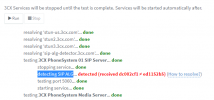
SIP ALG Firewall Tester Error.PNG
How to resolve link takes me to a page which has the following notes.. Everything else passes including all ports and my initial test of calling out and receiving a call seems to also be working

SIP ALG Test (since V15.5 SP1)​

In addition to the existing NAT test, 3CX evaluates if the firewall has SIP ALG enabled. SIP ALG in brief, are functions found in some firewall devices inspecting, beside the from and to IP/Ports access list, the content of the packages. In this case SIP. For the administrator of 3CX this can cause numerous issues and due to the fact that the changes to the SIP messages are made by an intermediate hop, traces made on 3CX will not show those changes. However they may cause incompatibility issues with remote IP phones or VoIP providers.

Unfortunately unless I missed something on the page it does not state how to go about resolving this issue and I am not sure how to understand this data.
 
Check to see if SIP ALG is enabled or disabled in the router that is in front of your 3CX server.
 
Check to see if SIP ALG is enabled or disabled in the router that is in front of your 3CX server.
Yes its enabled... thought it needed to be....
 
So it sounds like SIP ALG has been on for some time. If you aren't having any issues I wouldn't worry about it. The firewall tester is just that. It doesn't mean you will have issues, but it's an indicator of what the problem might be if you do have issues.

Regarding the SIP ALG, if you clicked on the 'How to resolve?' link it should tell you that SIP ALG should be off as well as provide some pretty easy instructions on how to do that for a number of firewall models. If your firewall is not listed, contacting your firewall manufacturer would be the recommended route.
 
  • Like
Reactions: ChrisC_3CX
So it sounds like SIP ALG has been on for some time. If you aren't having any issues I wouldn't worry about it. The firewall tester is just that. It doesn't mean you will have issues, but it's an indicator of what the problem might be if you do have issues.

Regarding the SIP ALG, if you clicked on the 'How to resolve?' link it should tell you that SIP ALG should be off as well as provide some pretty easy instructions on how to do that for a number of firewall models. If your firewall is not listed, contacting your firewall manufacturer would be the recommended route.
Thank you for the reply and insight. So far things seem to be working with it on... I will try to turn it off and see if that makes any difference.
 
This is something you need to configure on your firewall.

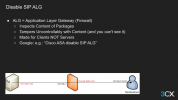
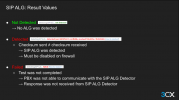
From the 3CX Academy.

1651574495218.png

1651574544879.png

We always want it disabled.
 
  • Like
Reactions: JohnS_3CX
Status
Not open for further replies.

Forum statistics

Threads
111,974
Messages
590,083
Members
164,900
Latest member
Silent_Guru