SIP peer to ISP voip router and RTP conflict

Status
Not open for further replies.

haris013

Bronze Partner
Advanced Certified
Joined
Aug 27, 2021
Messages
10
Reaction score
0
Hello, my ISP has sent me his CPE router which also acts as a SIP server. The cpe router has registered my SIP numbers and is running a SIP server service in order to connect my own PBX via sip peer.

I have created a SIP trunk using the lan IP that ISP provided me for SIP peer connection and everything works fine (ip based auth). My conncern is that ISP uses for RTP port range 10000-29000. Does this range conflicts with the 3cx rtp port ranges? ISP said that cannot change the rtp ports from their side and also they are not allowing me to register direct at them using sip trunk credentials. They require to use their equipment. cpe router is at the same network/gateway with my 3cx server.

How can i ensure that i won't have conflict and audio issues?
 
It may be that you are concerned about something that may not end up being an issue. It sounds as if 3CX is registered to a device. 3CX will utilize a range of ports to this device, Firewall checker will show if these are open. From that device, to your ISP, may be the port range that they are referring to.

If you list the ISP, someone else may have some experience with them, and the device you are using.
 
Thanks for the reply, i will try the firewall checker.

My ISP is Vodafone Greece and they sent me an Aethra pbx router
 
Last edited:
Hello again, bellow are the results from firewall checker:

I have a mikrotik router, alg is disabled and i have port forwarded all the required ports. Am I having conflict with my ISP device? Ports from 10000 range says it is unreachable. 9000 ports are fine
Code:
    resolving 'stun-eu.3cx.com'... done
    resolving 'stun2.3cx.com'... done
    resolving 'stun3.3cx.com'... done
    resolving 'sip-alg-detector.3cx.com'... done
    testing 3CX PhoneSystem 01 SIP Server... failed (How to resolve?)
        stopping service... done
        detecting SIP ALG... failed (How to resolve?)
        testing port 5060... done
        starting service... done
    testing 3CX PhoneSystem Media Server... failed (How to resolve?)
        stopping service... done
        testing port 5090... done
        testing ports [9000..9398]... done
            testing port 9000... done
            testing port 9002... done
            testing port 9004... done
            testing port 9006... done
            testing port 9008... done
          .
.
.
.
.
.
            testing port 9338... done
            testing port 9340... done
            testing port 9342... done
            testing port 9344... done
            testing port 9346... done
            testing port 9348... done
            testing port 9350... done
            testing port 9352... done
            testing port 9354... done
            testing port 9356... done
            testing port 9358... done
            testing port 9360... done
            testing port 9362... done
            testing port 9364... done
            testing port 9366... done
            testing port 9368... done
            testing port 9370... done
            testing port 9372... done
            testing port 9374... done
            testing port 9376... done
            testing port 9378... done
            testing port 9380... done
            testing port 9382... done
            testing port 9384... done
            testing port 9386... done
            testing port 9388... done
            testing port 9390... done
            testing port 9392... done
            testing port 9394... done
            testing port 9396... done
            testing port 9398... done
        testing ports [10600..10998]... failed (How to resolve?)
            testing port 10600... not reachable (How to resolve?)
            testing port 10602... not reachable (How to resolve?)
            testing port 10604... not reachable (How to resolve?)
            testing port 10606... not reachable (How to resolve?)
            testing port 10608... not reachable (How to resolve?)
            testing port 10610... not reachable (How to resolve?)
            testing port 10612... not reachable (How to resolve?)
            testing port 10614... not reachable (How to resolve?)
.
.
.
.
            testing port 10994... not reachable (How to resolve?)
            testing port 10996... not reachable (How to resolve?)
            testing port 10998... not reachable (How to resolve?)
        starting service... done
 
HI @haris013

The firewall checker with check the ports using your public facing NIC and IP Address. If the CPE device is dedicated to the SIP service then you probably have or need a second NIC to achieve the correct configuration.
Also you are connecting to your providers hardware using a local IP towards the CPE device correct? If that is the case the PBX will use its local ports to contact the provider so you should not have an issue there.

I would still investigate why the firewall checker is failing however and resolve that as well if possible.
 
HI @haris013

The firewall checker with check the ports using your public facing NIC and IP Address. If the CPE device is dedicated to the SIP service then you probably have or need a second NIC to achieve the correct configuration.
Also you are connecting to your providers hardware using a local IP towards the CPE device correct? If that is the case the PBX will use its local ports to contact the provider so you should not have an issue there.

I would still investigate why the firewall checker is failing however and resolve that as well if possible.
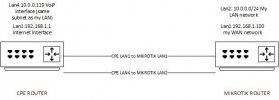
take a look to the diagram bellow, this is my topology. I DON'T have dual NAT, CPE router LAN1 is not NATted. I am port forwarding only from mikrotik router and everything is ok. Still even if i disconnect the CPE LAN4 (voip) the addresses from UDP 10.000 and above are unreachable at the firewall test.

Also I tried to connect an extra sip trunk I have from a certified provider(modulus greece) and it doesn't register, i got the following error
Code:
Registration at modulus SIP Trunk has failed. Destination (sip:185.73.43.250:5060;lr) is not reachable, DNS error resolving FQDN, or service is not available.

3cx is using google DNS, if I login to 3cx server with ssh, i can ping modulus trunk dns without problems. I talked with the provider and said that everything is ok from their side, they cannot "see" any registration attempts from me.

EDIT: about modulus sip trunk, i think the port 5060 conflicts with my ISP voip services which are running at 5060 too. I tried from 3cx to change the modulus trunk port to 6050 but it doesn't seem to work, still tries to register from 5060
 

Attachments

  • topology.jpg
    topology.jpg
    18.5 KB · Views: 4
Last edited:
Looking at your configuration it is not impossible to make it work however you need to figure out where this is going wrong. I would run packet captures on the PBX and microtik router to start with and run the firewall checker again.

You can check the results against this document to see where this is going wrong.

Regarding modulus, since your CPE is SIP aware it is very likely that is causing you issues with ALG and port 5060 and will not work with any other provider.
 
Looking at your configuration it is not impossible to make it work however you need to figure out where this is going wrong. I would run packet captures on the PBX and microtik router to start with and run the firewall checker again.

You can check the results against this document to see where this is going wrong.

Regarding modulus, since your CPE is SIP aware it is very likely that is causing you issues with ALG and port 5060 and will not work with any other provider.
Can I register to modulus from 6050 port? I had this setup previously when I was running asterisk server. ISP peer trunk was at 5060 and modulus at 6050. Regarding the firewall check i will run some packet capturing.
 
Can I register to modulus from 6050 port? I had this setup previously when I was running asterisk server. ISP peer trunk was at 5060 and modulus at 6050. Regarding the firewall check i will run some packet capturing.
You can register FROM 6050 but you will need to register to 5060 on the modulus side as modulus only supports registration ton 5060 so your CPE device will still be causing issues if it intercepts SIP messages.
 
You can register FROM 6050 but you will need to register to 5060 on the modulus side as modulus only supports registration ton 5060 so your CPE device will still be causing issues if it intercepts SIP messages.
So I understand that i cannot have modulus with ISP voip together?

I captured a pcap file from 3cx while i run again the firewall checker. I am not sure what I am looking for?
 
So I understand that i cannot have modulus with ISP voip together?
I cannot be sure of this but if the providers CPE device is intercepting traffic to 5060 then no you cannot not if your internet is also passing through the CPE. What we usually see if providers giving a CPE device dedicated for the trunk and the internet is handled by another device. In that scenario you just use a second NIC to route traffic to the provider for SIP using static routes and you access the internet through your other NIC.

I captured a pcap file from 3cx while i run again the firewall checker. I am not sure what I am looking for?
The guide I sent you in my previous reply explains what you need to look for for the ports that are failing.
 
I cannot be sure of this but if the providers CPE device is intercepting traffic to 5060 then no you cannot not if your internet is also passing through the CPE. What we usually see if providers giving a CPE device dedicated for the trunk and the internet is handled by another device. In that scenario you just use a second NIC to route traffic to the provider for SIP using static routes and you access the internet through your other NIC.


The guide I sent you in my previous reply explains what you need to look for for the ports that are failing.
The CPE device is one (1) for internet and voip together but each service is running at different NICs. If it makes any difference, internet NIC is another subnet and VOIP NIC can be totally different.

For example at the diagram few posts above, voip interface of the CPE router is at 10.0.0.0/24 network - the same network where my LAN is. This can be changed and be a different network e.x 172.16.xx.xx. Then I can assign a sencond NIC at the 3cx server and connect the voip nic from CPE router to 2nd nic of 3cx server. Will this solve the problem or still i will have the issues?
 
Then I can assign a sencond NIC at the 3cx server and connect the voip nic from CPE router to 2nd nic of 3cx server. Will this solve the problem or still i will have the issues?
This would be a better configuration but I cannot guarantee that this will solve your issue because we don't know what exactly is causing your issue. For that you will need to do some troubleshooting as I explained above.
If you are having issues with troubleshooting you can always get in touch with a 3CX partner for assistance.
 
hello again, i have analyzed the pcap file and all the ports from 10.000 till 10999, the server sends 3 packets but doesn't receive reply. the ports from 9000 till 9999 they all received a response.

My firewall settings are correct because i am port forwarding the range 9000-10999. So i am suspecting that the media ports that my ISP is using are conflicting with 3cx. ISP uses port range for media 10.000-30.000 and they cannot change that.

Can i change the media ports from 3cx side and check again with the firewall checker? How can i change that?
 
Can i change the media ports from 3cx side and check again with the firewall checker? How can i change that?
No you cannot but if that is your only issue then I would not worry about it unless you are planning to use the 3CX webmeeting which will need to use those ports. As mentioned since the CPE device is local the PBX will use its local port range to contact the CPE which will not cause any conflict.
 
No you cannot but if that is your only issue then I would not worry about it unless you are planning to use the 3CX webmeeting which will need to use those ports. As mentioned since the CPE device is local the PBX will use its local port range to contact the CPE which will not cause any conflict.
So i should be fine despite that firewall checker doesn't pass the tests above ports 10.000?

So far i don't have any voice issues, locally and remotely everything works fine. Also I connected the modulus trunk at port 6050 and is registered properly along with the ISP local trunk. All issues resolved!
 
Do you have a local IP as a registrar in your Vodafone trunk? If so you should not have any issues.
 
  • Like
Reactions: haris013
Status
Not open for further replies.

Forum statistics

Threads
111,993
Messages
590,175
Members
164,931
Latest member
admintest