Solved SIP Trunk Lifecell Ukraine

Status
Not open for further replies.

drsam.theme

Customer
Joined
Jan 3, 2024
Messages
29
Reaction score
6
Hello!
Who can help? I took 3cx on AWS from the marketplace, registered it, everything works. The application on the mobile is connected, Firewall in 3cx runs without errors, but it is not possible to connect the SIP trunk. The operator says that registration requests are not coming. Maybe something else needs to be allowed on AWS? Thank you!
 
Hi
is it a registred trunk or IP based one ?
Is it a supported provider ?

As your firewall check is passed green, so you are good to go. Normally this is not on aws side.
If your trunk is ip based then you most probably need to register your ISP public IP on SIP provider side to allow it to work
 
Which Release of the PBX is it ? V18 or the new one V20?
Did you use a trunk sip template to install it or was it done from a generic template?
 
Hi
is it a registred trunk or IP based one ?
Is it a supported provider ?

As your firewall check is passed green, so you are good to go. Normally this is not on aws side.
If your trunk is ip based then you most probably need to register your ISP public IP on SIP provider side to allow it to work
Thanks for answering
Yes, it a registred trunk with SIP User ID and password for Authentication
No, is not supported provider.

I gave the provider my public IP, he registered it. But he says there are no requests from him
 
Which Release of the PBX is it ? V18 or the new one V20?
Did you use a trunk sip template to install it or was it done from a generic template?
New one V20. More precisely, V18 was installed from the AWS marketplace template, then updated to V20
I used the generic template, because I couldn’t find the lifecell provider template

I get an error:
ID
12293

Registration at Lifecell has failed. Destination (sip:csbc.lifecell.ua:5061;transport=TLS;lr;maddr=212.58.160.196) is not reachable, DNS error resolving FQDN, or service is not available.
 
Well is does seem to resolve to your providers IP, so it doesn't seem to be a DNS issue. Could it be that you have provisioned the port incorrectly, do you use something other than 5061?

Even so, they should see something from the PBX.
 
I see you are using TLS. That could mean that the process gets stuck in the TLS handshake thus why the provider does not see registration traffic.

I suggest you use a supported provider to avoid these kind of issues.
 
Well is does seem to resolve to your providers IP, so it doesn't seem to be a DNS issue. Could it be that you have provisioned the port incorrectly, do you use something other than 5061?

Even so, they should see something from the PBX.
Thanks for the answer!
A standard set of ports is used for incoming traffic
Network Ports
SIP:5060
SIPS:5061
Tunnel:5090
Media:9000-10999
HTTP:80
HTTPS:443
Outgoing traffic is completely open.
Mobile 3сх connected to the PBX without any problems. Internal calls work.
 
I see you are using TLS. That could mean that the process gets stuck in the TLS handshake thus why the provider does not see registration traffic.

I suggest you use a supported provider to avoid these kind of issues.
Thanks for the answer!
I’ll try to negotiate with the provider to change the transport protocol to TCP or UDP and disable SRTP. It is possible to change registration by IP based one.

There are not many supporting providers in Ukraine
 
I’ll try to negotiate with the provider to change the transport protocol to TCP or UDP and disable SRTP
This might be your best option for now
 
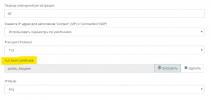
Can anyone tell me how to add an operator certificate? The picture shows the loading of the certificate in the SIP trunk settings, in v20 i don’t see this parameter.
1704439181061.png
 
In V20 the parameter is not there so you cannot upload a new root certificate. For supported providers we preload the necessary certificates so they can be used when adding the trunk.
 
In V20 the parameter is not there so you cannot upload a new root certificate. For supported providers we preload the necessary certificates so they can be used when adding the trunk.
Wow. What am I supposed to do? The TCP/UDP operator does not work, only TLS. And for TLS need a certificate. How can I add it?
 
The problem was solved. Downgraded to v18, added an operator certificate, SIP trunk started working.
 
Status
Not open for further replies.

Latest Posts

Forum statistics

Threads
111,991
Messages
590,166
Members
164,929
Latest member
Cloudstar