SIP Trunk suddenly not working anymore

Status
Not open for further replies.

makneidinger

New User
Joined
Jul 28, 2022
Messages
5
Reaction score
1
Hello,

I started using 3cx about a month ago and everything worked until 13.07.22 (at least that's when I got the last call). I was on vacation until now and suddenly I can't call anyone and can't receive calls anymore. In the webclient the SIP Trunk shows a red square, so I guess there is some issue there. My SIP provider tried the SIP trunk on his test system and says it is working for him, so there seems to be an issue on the 3cx side.

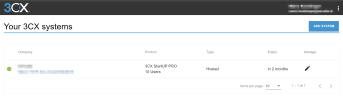
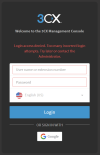
In the protal, the system shows up in green and says that everything is fine though. But I can't login into the 3cx Management Console because I get the error "Login access denied. Too many incorrect login attempts. Try later or contact the Administrator."
 
My SIP provider said that he receives no registrations. So, the issue has to be somewhere at 3cx. He guesses that it is a firewall issue.
 
Things change on us when we aren't looking. I just spent two day troubleshooting something similar.
Check your current IPv4 address and make sure it didn't change. If so, correct it in the 3CX|Serttings|Network.
Make sure your "Static" IP address is correct.
 
I am not managing anything here.
My SIP provider is listed under "preferred" on the list of 3cx and I can't select anything else except this one for my country. And as I said I don't have access to the 3cx Management Console, because of the error "Login access denied. Too many incorrect login attempts. Try later or contact the Administrator."

Since it is hosted by 3cx, I guess the administrator is 3cx. And I am not willing to buy a support ticket to "contact the administrator" for a free product. If they offer a free product, it should work without having to pay, otherwise why bother at all.

I am currently quite disappointed at 3cx because of this. I have to use my private phone to make business calls and nobody who has only my business number can contact me.
 
Last edited:
I'm not sure what exactly you are disappointed in 3CX for. As you said, it's free. I would start with checking the status of your 3CX hosted instance via the customer portal. You can restart your 3CX instance from there which may solve the issue. You can also try using the free support that goes along with the free PBX to troubleshoot your inability to login
 
Last edited by a moderator:
I am disappointed because it suddenly stopped working without changing anything and without an option for me to fix it. I chose the hosted version so I don't have to manage it myself and mess with the settings.
The instance show green in the customer portal and there is no option to restart it. What free support? If I click on Support there is only the option to buy a support ticket or ask the community.

I don't get the "Forgot password?" option, because I get the following error, no matter what I enter or how often:
1659127589203.png
 
You don't have startup but a dedicated instance. It's better you switch to startup. Free products don't include free support, you might need a partner to help you. And it wont be free, I don't think you provide your services free either. However try on startup first you might be able to do it yourself.
 
But I have startup as it says here:
1659346408766.png


Why do you think I don't have it?

I understand that a free product has no support. But I already had it up and running and it suddenly stopped without me making any change to it. And now I have no option to solve it, since it seems there is a configuration issue that I can't control.
 
  • Like
Reactions: Evolute IT
Status
Not open for further replies.

Members Online Now

Forum statistics

Threads
111,831
Messages
589,277
Members
164,660
Latest member
RJenkinsROCK