SIP Trunk

Status
Not open for further replies.

Tin Nwe Win

Gold Partner
Joined
Jul 3, 2021
Messages
218
Reaction score
25
Hello Guys,

I did not receive incoming calls after I configured the SIP trunk, but the outgoing call is working.

Could you please advise me on how should I check this?
 
  • Love
Reactions: Tin Nwe Win
Hi @Tin Nwe Win

Check the call log and the activity log of the PBX to see if you can see the inbound calls that are failing. If the calls reach the PBX then you will see some logs of them. If there are no logs for those calls then it probably means that the calls are not reaching your PBX and you should speak with your provider.
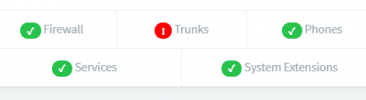
Also make sure that the firewall checker passes all tests to ensure that there are no network issues.
 
  • Love
Reactions: Tin Nwe Win
@Saqqara Thanks for your info and help.

@YiannisH_3CX Noted with thanks. I have already checked the Firewall that it says no network issues.
I am not checking the activity log yet. Thanks a lot for your prompt support.
 

Attachments

  • Capture.PNG
    Capture.PNG
    4.7 KB · Views: 10
Let us know what you find.
 
  • Love
Reactions: Tin Nwe Win
Hello Guys,

I am very new to 3CX PBX.

May I know, how can I check the activity log?

Please kindly guide me for that..
 
Hi Tin,

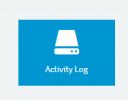
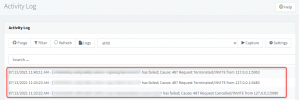
You can check the activity log option in "DASHBOARD". Once you enter in there you can see your logs both Incoming & outgoing. Just find the your Incoming number to get the error code and the reason.

1626152040999.png

1626152231386.png


Thanks.
RA.
 
@ RA .. Thank you very much for your help. I will check and get back to you.
 
Status
Not open for further replies.

Forum statistics

Threads
111,992
Messages
590,171
Members
164,929
Latest member
Cloudstar