Solved SIP Trunking not working

Status
Not open for further replies.

texmansru47

SOHO User
Joined
Jan 9, 2021
Messages
122
Reaction score
20
Well this is a continuing issue. I got my two phones to work... (I have to upgrade them now). The PBX to PBX calls work but the external DID calls get no sound. I was told to get my SIP provider involved which I did and when they asked for access to my local PBX they could not get through. I am sure it isn't my local FW but it may be my ISP provider. I believe I may have missed a setting there to allow the external world to see my PBX (like if I am remote - which I tested and I cannot get in either). Should I start with my provider or should I look elsewhere first?
 
  • Like
Reactions: YiannisH_3CX
I did that again and it came back perfect. Is there a port NOT listed on there that is required for the remote access to the local 3CX Servers?
 
Not really. If you use 5001 then open that one, if 443 open that one. Just always make sure to choose the right protocol (TCP/UDP.)
 
Also make sure that your FQDN resolves to the correct public IP. Can your provider reach the management console of your system? Are they using the correct https FQDN and port? Ask them to perform an DNS lookup of your FQDN and see if it resolves to the correct public IP for them.
 
  • Like
Reactions: Evolute IT
There was a hang up with my ISP router and I hope we got that resolved. We will try to have the SIP provider try again in the morning. Fingers crossed. All ports passed the firewall test (all green) Except I did get this (everything was in green):

  • testing 3CX PhoneSystem 01 SIP Server... done
    • stopping service... done
    • detecting SIP ALG... not detected
    • testing port 5060... done
    • starting service... done
 
  • Like
Reactions: YiannisH_3CX
Great. let us know of the results.
 
Also make sure that your FQDN resolves to the correct public IP. Can your provider reach the management console of your system? Are they using the correct https FQDN and port? Ask them to perform an DNS lookup of your FQDN and see if it resolves to the correct public IP for them.
I will try that for sure!
 
Well, they could not get in. On the DNS Lookup we got the following:

Non-authoritative answer:
Name: trwlnxpi02.3cx.us
Addresses: 2601:2c7:782:4160:dea6:32ff:fe38:a330
73.155.21.81

How do I find out the correct public IP... should it be the public IP for my ISP-based network (makes the most sense), so maybe there is a NAT need to get it there... At this point, I am not sure but I know the Public IP appearing is not the IP subnet I have been provided by my provider.
 
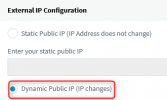
The IP should be your public IP given to you by your ISP not the local IP of the machine. If that is the wrong public IP then access your management console, navigate to Settings / Network and switch the IP to Dynamic.
1642079852989.png

Save the change and restart your 3CX services from the "Services" menu on the Dashboard. That will perform a STUN query and will discover your correct public IP (if your network allows it) and will update the DNS with the new IP. It might take a few hours for the DNS propagation to reach you but then it should report the correct public IP address.
 
Will do. I will definitely do that when I get home this evening. Thank you!
 
Change made... waiting on the DNS.
 
If that fails and the IP was correct then that probably means that the port 5001 is not properly open on your firewall. Port 5001 is not tested by the firewall checker btw
 
It is still showing the same IP address... the wrong IP
 
Is the PBX installed locally? If so search google for what is my ip address and see if those match. Also do you have a static public IP or a dynamic one? Do you have only one ISP for internet or 2 for redundancy or load balancing?
 
  • Like
Reactions: Evolute IT
The PBX is local. The IP is dynamic and I got them to be the same now (I did an NSlookup from my work), but I read in one of the comments that I may have to open port 5001 on my firewall at home since that port is critical for this remote access and it is not covered by the PBX firewall checker.
 
To access the PBX remotely you do need to open the port 5001
 
hmmm... then I am at a loss.
 
To access the PBX remotely you do need to open the port 5001
To be clear, the port needs to be open on the PBX side, not the remote side. So port 5001 needs to be open for inbound traffic to the PBX. Is the port open?
 
That is what I did... my personal firewall at my house has that port opened.
 
Status
Not open for further replies.

Forum statistics

Threads
111,990
Messages
590,165
Members
164,929
Latest member
Cloudstar