- Joined
- Sep 25, 2019
- Messages
- 3
- Reaction score
- 0
Hi there!
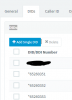
I got a sipgate test-trunk with 5 test numbers to include these in my 3CX. So, the main problem is to set more than one number as a DID. I already contacted Sipgate to get some infiormation about it. All numbers are main-numbers in this case. I can set one of the five numbers as a main-number and enter the rest as DIDs. So far, so good.
At this point, i got a couple more questions:
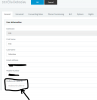
So - the main step now is to set up five extensions and connect these with my five sipgate-testnumbers. The trunk i already in function, i can dial out and in, but only with one number, the number i set as the mainnumber in the trunk. As soon as i set one more DID in the trunk, the dials are not going out or in anymore. I dont know what the problem is and i hope that one of you can help me out here.
--------------------
Sofern gewollt könnt ihr auch in Deutsch anworten.
I got a sipgate test-trunk with 5 test numbers to include these in my 3CX. So, the main problem is to set more than one number as a DID. I already contacted Sipgate to get some infiormation about it. All numbers are main-numbers in this case. I can set one of the five numbers as a main-number and enter the rest as DIDs. So far, so good.
At this point, i got a couple more questions:
- The right format to be used is "49", right? Not +49 or 0.
- Which In- and Out-Parameters i need to set for my Sipgate-Trunk? I anyone here who knows that?
So - the main step now is to set up five extensions and connect these with my five sipgate-testnumbers. The trunk i already in function, i can dial out and in, but only with one number, the number i set as the mainnumber in the trunk. As soon as i set one more DID in the trunk, the dials are not going out or in anymore. I dont know what the problem is and i hope that one of you can help me out here.
--------------------
Sofern gewollt könnt ihr auch in Deutsch anworten.