If you want to see a report of the conversations of your PBX, you will need to navigate to Admin options > Reports and create a Chat Log report. That way, you will be able to access each conversation directly to see its contents. Please note that there is no option to export or download all chat activity in bulk.
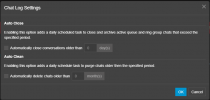
Regarding retention for the SMS logs, you can set this up by navigating to Admin options > Dashboard > System Maintenance > Chat Log settings, under the 'Auto Clean' option: