Solved SMS not working

Status
Not open for further replies.

burritoisland

Customer
Joined
Jan 28, 2022
Messages
16
Reaction score
4
When I go into Messaging and "Add SMS", it takes all of my info, the "TEST" button says that it's successful. But when I click the "OK" button, nothing happens. It doesn't save any of the info that I entered. Thanks!
 
When I go into Messaging and "Add SMS", it takes all of my info, the "TEST" button says that it's successful. But when I click the "OK" button, nothing happens. It doesn't save any of the info that I entered. Thanks!
Are you on the pro or enterprise version. I had the same issue, and had to upgrade the version for it to activate.
 
Are you on the pro or enterprise version. I had the same issue, and had to upgrade the version for it to activate.
Pro version
 
Try restarting all 3CX Services from Dashboard --> Services, then try adding it again.
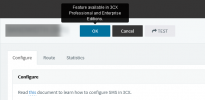
Also when you hover over the OK button, do you get a message like this?
1643710429555.png

Just to make sure I understand, you are pressing the OK button and you are left on the same screen where you fill in the information, not that you are being taken to another page, am I understanding it correctly?
 
Solved. The issue ended up being that the system still read that I was in a trial of Pro even though I had done the upgrade. I had to restart all of the services from the Services section of the Dashboard. After I restarted the services, the system recognized the subscription and it allowed me to click the "OK" button. Thanks!
 
  • Like
Reactions: NickD_3CX
Excellent! Glad you got it sorted out :)
 
Status
Not open for further replies.

Forum statistics

Threads
112,065
Messages
590,584
Members
165,019
Latest member
rsaldin@advancedbrainspin