SMS - "Number has active conversation", while it has not

Status
Not open for further replies.

fgc92210

Customer
Advanced Certified
Joined
Oct 28, 2020
Messages
185
Reaction score
29
Greetings all,

We are having issues with the SMS feature when an agent tries to start a new conversation through SMS with a number, and 3CX answers "Number you specified has active conversation with extension xxx first_name last_name already"

XXX was an extension that was previously deleted, then re-created for a new employee.

We searched through the admin / monitor feature, and can't find this conversation anywhere.
We logged in as the new XXX extension web page, and there is no active conversation.

Any work around?
 
Hi @fgc92210,

Thanks for bringing this to our attention. We replicated this behaviour and will look into it. We found that purging the call history allows new extensions to send SMSs to previously contacted numbers.
 
Hi @fgc92210,

Thanks for bringing this to our attention. We replicated this behaviour and will look into it. We found that purging the call history allows new extensions to send SMSs to previously contacted numbers.
Excellent. Looking forward to the fix :)
Your temporary fix of purging the call history: Meaning call log, as per reboot the system? Or call history of the queue?

Thank you
 
Hi @fgc92210,

That would be the chat history on the dashboard.

EDIT:

Note that this is an irreversible process so it is highly recommended to create a backup before hand.
 
Last edited:
@VasilisV_3CX
From our tests, even though the past employee at this extension got deleted, and re-created with a new first name / last name , the error message still shows up with the old employee name.

Is there any way you can do a remote session and hit the database of my customer, in order to fix this issue?
Thank you.
 
Hi @fgc92210,

From our testing, we found two options.

1) Purge the chat history, noting that this will delete all chats for all agents on the system, then send a message from the same extension with new employees name.
2) Send a message to the same number continuing the conversation for that extension, then mark it dealt with, which will close the conversation.
 
Hi @fgc92210,

From our testing, we found two options.

1) Purge the chat history, noting that this will delete all chats for all agents on the system, then send a message from the same extension with new employees name.
2) Send a message to the same number continuing the conversation for that extension, then mark it dealt with, which will close the conversation.
Regarding your first option.. What chat history are you talking about?
This chat is actually not showing up under the re-created extension, and nobody has a history in their chat logs.
It's in the system database, but unavailable for any users.

We'll try #2 eventually. Not the best to send a random message to cell phones lol..
 
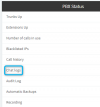
On the PBX that facilitates the chats, you should see chat logs under the PBX Status section on the Dashboard:

1615384360932.png
 
Hi,
Chat logs are disabled because of HIPAA request.
That's going to be tricky now. Can they be 1)Enabled 2)Deleted 3)disabled ?
 
Indeed, you can click the Disabled button to enable them, then purge then click the Enabled button to disable them once again.

1615385010990.png
 
Just an update on this, we shall be addressing this case in V18, so whenever an extension is deleted, all active conversation with SMS numbers will be also closed to avoid this problem from happening.
 
  • Like
Reactions: fgc92210
Status
Not open for further replies.