Solved SMS with VoIP.ms

Status
Not open for further replies.
I've followed the documentation to the letter. it worked on a generic trunk before the update and only broke after switching the token and webhook URL to match with the official supported voip.ms trunk for me
 

If your 3CX license is a "Free" version,

the SMS functionality is not intended to work.

If it is not a free version, see the following:


Don't worry about the "Generic" label; this means that the Voip.MS SMS API (JSON payload) adheres to the 3CX generic model, which is great. This indicates that Voip.MS did not "force" 3CX to adopt a custom model. Personally, I prefer this because, in my opinion, if a problem arises with the SMS mechanism, it is much easier to diagnose. You can simply test with the generic SIP trunk template using a WebHook testing tool, and it will be possible to easily identify issues using the guide published by 3CX.

If you have any "open" SMS conversations in the WebClient, please archive them and start a new conversation to ensure the conversation uses the new configurations.

Try again.

If the issue persists, proceed;

If it's On Premise / self-hosted,
Access the "DN properties" menu
(See the procedure here for enable;
https://www.3cx.com/community/threa...ension-and-queue-properties.81524/post-376714 )

Refresh the page, go to the new "DN properties" tab.

In the dropdown menu, find the Voip.MS SIP Trunk name corresponding to your setup.

Review the DN properties, you will find the PROVIDER_URL property .

Do not change anything ! (do so at your own risk)

This should have the value : https://voip.ms/api/3cx/msg
If not, do not change it.

Delete the SIP Trunk configuration on the voice & chat page (not the DN properties) and recreate the SIP TRUNK configuration.

Ensure that your DID is not configured twice on your phone system.

Ensure that SMS conversations are archived.

I have tested on my 3CX server, and I see the PROVIDER_URL property is correctly referenced.
 
Last edited:
If it is not a free version, see the following:


Don't worry about the "Generic" label; this means that the Voip.MS SMS API (JSON payload) adheres to the 3CX generic model, which is great. This indicates that Voip.MS did not "force" 3CX to adopt a custom model. Personally, I prefer this because, in my opinion, if a problem arises with the SMS mechanism, it is much easier to diagnose. You can simply test with the generic SIP trunk template using a WebHook testing tool, and it will be possible to easily identify issues using the guide published by 3CX.

If you have any "open" SMS conversations in the WebClient, please archive them and start a new conversation to ensure the conversation uses the new configurations.

Try again.

If the issue persists, proceed;

If it's On Premise / self-hosted,
Access the "DN properties" menu
(See the procedure here for enable;
https://www.3cx.com/community/threa...ension-and-queue-properties.81524/post-376714 )

Refresh the page, go to the new "DN properties" tab.

In the dropdown menu, find the Voip.MS SIP Trunk name corresponding to your setup.

Review the DN properties, you will find the PROVIDER_URL property .

Do not change anything ! (do so at your own risk)

This should have the value : https://voip.ms/api/3cx/msg
If not, do not change it.

Delete the SIP Trunk configuration on the voice & chat page (not the DN properties) and recreate the SIP TRUNK configuration.

Ensure that your DID is not configured twice on your phone system.

Ensure that SMS conversations are archived.

I have tested on my 3CX server, and I see the PROVIDER_URL property is correctly referenced.
looks like the provider URL is completely missing from the DN Properties. i will attempt to recreate the trunk during lunch or after business hours today and let you know how it wen, thanks for your help.
 
@Guillaume Bourgeois , that worked, thank you very much for your help.

this should be preventable this is actually predictable based on my timeline of events:
  1. I created the voip.ms trunk on v20 or v20-U1 (no SMS support)
  2. updated to v20 and trunk now shows SMS options page on existing trunk
  3. I plug in my settings but it doesn't actually work
  4. delete and recreate trunk allows settings to take affect and am able to sent SMS successfully
proposed solutions:
  • option 1: if an active template changes during an update, convert original template into a legacy template so that it doesn't effect future changes and put a label saying to use the new template to get the latest features/fixes
  • option 2: migrate template but create script to add the new settings it might require in all places (might break something though if it requires an update on another platform though)
  • option 3: disable / grey out the template and force the user to create a new one before proceeding
  • option 4: potentially the easiest, write a list of breaking changes in the release notes.
 
  • Like
Reactions: Guillaume Bourgeois
Glad to know the issue is resolved.
 
  • Like
Reactions: Evolute IT
Any chance 3CX can create a method to conform existing VOIP.ms template to the new format? Delete and recreate isn't quite tenable for those with dozens of installs and hundreds of DIDs...
 
Just to clarify, the tab is displayed but the SMS aren't working, right ?Just to clarify, the tab is displayed but the SMS aren't working, right ?

Any chance 3CX can create a method to conform existing VOIP.ms template to the new format? Delete and recreate isn't quite tenable for those with dozens of installs and hundreds of DIDs...


The issue is not that 3CX does not expose / conform existing Voip.MS SIP Trunk Configs with the new settings available in an existing Trunk, after updating the provider's template; the updates are properly implemented and do expose the new parameters. However, they do not automatically generate the DN property for provider url in the existing SIP Trunk. This problem does not occur when creating a new trunk with an updated template, but only during the refresh of an existing template.

The recommended solution is to recreate the Trunk, as explained here:
https://www.3cx.com/community/threads/sms-with-voip-ms.124541/post-609676


However, if you are willing to take risks and understand that the method I am about to describe is neither recommended not supported by 3CX,
it could nonetheless resolve your issue (or potentially make it worse :oops:).


1723760290933.png
It is important to note that the 3CX team has never validated that modifying or manipulating the DN properties used by the 3CX system ❌ is safe ❌.
(in fact, they have always indicated the opposite, is NOT recommended).

Therefore, consider this method as not recommended until further notice from
the 3CX staff.
Although this approach has worked for me on several
3CX systems without causing immediate issues,
I cannot guarantee the long-term effects or potential risks to other features or
the stability of the SIP Trunk.
I took the risk with full knowledge of the consequences, and you?
1723760290933.png

In the previous procedure I shared,
at the step where I indicated "Do not change anything! (do so at your own risk)",

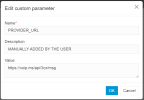
Add a new property :

named

PROVIDER_URL

with the description
MANUALLY ADDED BY THE USER

and the value


Here is what it should look like:

1723759469178.png

Click OK,


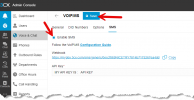
then return to the configuration of the existing SIP Trunk (under the Voice & Chat tab).
Go to the SMS tab, deactivate it if active, save, then reactivate it and save again.
If SMS is already deactivated, simply activate it.


1723759644071.png
 
Last edited:
  • Like
Reactions: Evolute IT
Thanks Guillaume, first test seems to have that working. I see how it would work, and hopefully it'll persist after updates.
 
Thanks Guillaume, first test seems to have that working. I see how it would work, and hopefully it'll persist after updates.

You are welcome. :D
While I can't guarantee that you won't encounter any issues, to give you an idea, I've used this method for another SIP provider (template) on many systems on V18, and it didn't break after upgrading to V20. :p

However, please conduct your own tests as I'm not a fan of solutions not supported by 3CX. I always anticipate the worst. :eek:
That said, sometimes we need to make small exceptions, as in this scenario. :cool:
 
  • Like
Reactions: NateDoc
First time ever posting in any kind of a forum like this and I may need to be redirected somewhere else so please let me know. Im new to 3CX and I have everything working just as intended, except trying to go to the my trunk in 3CX, go into “SMS” and click the “enable” checkbox and them enter the API key, then save button seems to not want to save the data. Its almost like the SMS option is not allowed/available for whatever reason. im using chrome and using
3CX SMB PRO 20 Users. It says startup though. Just wondering if I need to purchase something else or maybe this version doesnt support it? Says in using version 20 update 2. Everything is configured in voip.ms as well.
Thank you
 
except trying to go to the my trunk in 3CX, go into “SMS” and click the “enable” checkbox and them enter the API key, then save button seems to not want to save the data.

When you press Save, it should take you back to the list of Trunks.
Open your Voip.MS trunk again, go to the SMS tab, and check if the API key is still there ?
 
  • Like
Reactions: tudubster
i switched from generic trunk to move the settings into the voip.ms trunk after the update and while inbound sms works fine, im getting the following:
Code:
Failed to send message(s) to the provider 'generic' from 'REDACTED' to 'REDACTED'. Exception: {"errors":[{"code":"10009","meta":{"url":"https://developers.telnyx.com/docs/overview/errors/10009"},"title":"Authentication failed","source":{"pointer":"/"},"detail":"Could not find any usable credentials in the request."}]}

I've noticed that provider says generic in the error, could it be stuck trying to use the old non-existent trunk?
I ran in to the same issue any ideas on how to fix this?
 
I ran in to the same issue any ideas on how to fix this?
I followed @Guillaume Bourgeois instructions of deleting and recreating, apparently there is a setting that doesn't get transferred so you need to delete the trunk and recreate it. (that's assuming you have a pro license or greater as otherwise SMS isn't supported)
 
Status
Not open for further replies.

Members Online Now

No members online now.

Forum statistics

Threads
111,843
Messages
589,327
Members
164,679
Latest member
SamadMYK