- Joined
- Sep 28, 2009
- Messages
- 60
- Reaction score
- 6
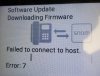
I have two Snom phones on a demo system. They give me an error each time that I boot up the phone. The phones are on the supported firmware version.
I spent half an hour working with Snom support. I downloaded firmware from their site and then installed it on one phone. That worked. It doesn't look like an issue with the phone.
But when I boot up connected to 3CX, I get an error every time. Is the problem with 3CX? Can I delete the firmware/snom directory and have 3CX reload it?
Thanks.
I spent half an hour working with Snom support. I downloaded firmware from their site and then installed it on one phone. That worked. It doesn't look like an issue with the phone.
But when I boot up connected to 3CX, I get an error every time. Is the problem with 3CX? Can I delete the firmware/snom directory and have 3CX reload it?
Thanks.