snom ext registration over 4G/LTE network connection

Status
Not open for further replies.

SimoneNesi

SOHO User
Joined
May 17, 2019
Messages
35
Reaction score
4
HI,
my infrastructure is made by:
1 3CX on OVH cloud
adsl internet connection
firewall (10.1.1.x)
10 SNOM D712 desk phone
3CX windows client
DHCP and DNS are on internal server

Everything is working fine with adsl router and I'd add a backup line using 4G/LTE router.
I started the test replacing the adsl router with 4G router, the network and internet navigation are working fine and I can place calls using 3cx windows client.
The problem is on the desk phones that can't registered.

- IP provision method DIRECT SIP (STUN - remote
- interface xxxxxxxx.my3cx.it

Can you help me?
Thanks
Simone
 
Hi Simone,

This is because STUN phones have strict requirements that most LTE connections will not likely be able to fulfil. This is because port forwarding will not work over LTE modems, since most carriers put LTE connections behind a CGNAT that you cannot control.

A 3CX SBC can solve this problem in most cases.
https://www.3cx.com/docs/3cx-tunnel-session-border-controller/

1. Try installing an SBC

2. Delete 1 phone from its extension

3. Factory reset the phone

4. If it asks for user/pass ignore it (press cancel)

5. Go to the 3CX Phones page and you will see that phone appearing in bold letters

6. Select it, and assign it to your extension


Now, when the 4G router takes over, the phone should be able to register again in a short time and you will be able to use it.
 
Hi John,
thanks a lot for your prompt replay, I'll test the solution during the weekend to avoid any production impact.
Thx
Simone
 
  • Like
Reactions: JohnS_3CX
Sure thing Simone, let us know how it goes
 
Hi John,
I installed the SBC on windows and I used a spare phone and it configured on my extension, then I moved the WAN connection from xDSL router to 4G router and my phone works perfectly !!!

Thx a lot for this great solution.
Simone

p.s. I'm currently using v.16.0.8.9 and the v.18 is ready for installation, What do you think is the best method for upgrade? Will the hw fit the requirement for the new version? Current 3CX utilization are disk 47%, memory 40%, cpu 4%.
thanks
Simone
 
  • Like
Reactions: JohnS_3CX
Hello, for upgrade on Windows take a backup of it. I do 2 just in case and delete then install V18 and restore.. Most cases this is 10 minutes....
 
If you follow Victor's advice, take care to keep backuped files out of 3Cx folders otherwise 3CX deletion will wipe your backups and then you can cry a while:):p
 
Hi Simone,

Please read the requirements here so you can confirm if you need any VM changes before the upgrade.
https://www.3cx.com/docs/recommended-hardware-specifications-for-3cx/

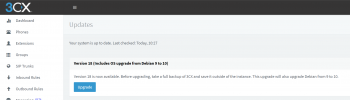
Since you are on V16, you should have the upgrade option shown in the screenshot below.
Ensure that you have a recent backup that is stored outside of this machine. In case something does not go as planned, you can use that backup to re-deploy a fresh VM.

The procedure will take some time, so schedule some downtime before you proceed.
Restart the machine to have a fresh boot, and then click Upgrade like seen below.
1636964871592.png

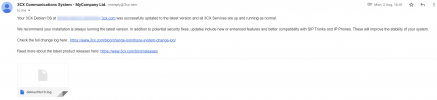
Some time later, you will receive an email informing you of the outcome of the OS upgrade (whether it succeeds or fails).
1636965393448.png
 
Status
Not open for further replies.

Members Online Now

Forum statistics

Threads
111,832
Messages
589,283
Members
164,662
Latest member
DejanMDS