• We do not provide troubleshooting help for unsupported phones. Please try with a supported phone.
  • V20 Update 10 Alpha 2 Learn more

Softphone.pro and 3CX

Status
Not open for further replies.

hernanp

SOHO User
Basic Certified
Joined
Jun 17, 2021
Messages
43
Reaction score
2
This is not an IP phone, but a windows app. There is no option in the forum for this, so I guess this is the closest category. I'm trying to use the softphone.pro application with my 3CX extension. It works perfectly with all VoIP vendors, but it does not register with 3CX.
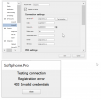
msedge_rZSzFWLbPC.png


I know the credentials are OK. Here is the debug log... Any ideas?
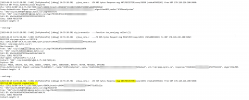


notepad_uv0KsbUNEj.png
 
Is Direct SIP / Stun disabled for that extension? Is the IP on the blocklist?
 
This is not an IP phone, but a windows app. There is no option in the forum for this, so I guess this is the closest category. I'm trying to use the softphone.pro application with my 3CX extension. It works perfectly with all VoIP vendors, but it does not register with 3CX.

View attachment 36064


I know the credentials are OK. Here is the debug log... Any ideas?


View attachment 36063
We suggest using only 3cx apps, which are fully compatible and supported. Avoid using any 3cx party unsupported apps with 3cx to avoid issues.
 
  • Like
Reactions: N_G
Is Direct SIP / Stun disabled for that extension? Is the IP on the blocklist?
IP is the same as the IP phones, so not blocked.
Block remote phones using stunt is not checked.
 
We suggest using only 3cx apps, which are fully compatible and supported. Avoid using any 3cx party unsupported apps with 3cx to avoid issues.
understood. We have a very specific requirement that is to play a sound file during the call. We looked into external tools (voiptools) but they informed that hosted instances cannot use their solution, so the only option we can think of is to have an app that can play a wav/mp3 file during the call, and softphone.pro offers this feature.

1687290203574.png

Is there any way to do this with the webapp?
 
IP is the same as the IP phones, so not blocked.
Block remote phones using stunt is not checked.
Check the 3CX logs (place the PBX in verbose) to see if any additional information is available.
 
This is not an IP phone, but a windows app. There is no option in the forum for this, so I guess this is the closest category. I'm trying to use the softphone.pro application with my 3CX extension. It works perfectly with all VoIP vendors, but it does not register with 3CX.

View attachment 36064


I know the credentials are OK. Here is the debug log... Any ideas?


View attachment 36063
3cx use 3 way login

Extension number
ID
Password

in the previous version we can put the extension number in the ID, but with the new version we must have 10 number lower uper case ... i dont' know if we can bypass that ...
 
To be more precise, we DO support 3CX instances hosted in the cloud (examples: AWS, Azure, Google, etc.). What is not possible is hosting your server with 3CX's hosted service because they do not permit the use of Call Flow Designer (CFD) or 3rd-party applications. But you can host anywhere else -- on-prem or in the cloud.
 
@hernanp
You can also try using the IP address of 3CX server for SIP server instead of the FQDN as a test.

3cx use 3 way login

Extension number
ID
Password

in the previous version we can put the extension number in the ID, but with the new version we must have 10 number lower uper case ... i dont' know if we can bypass that ...
I the latest version you can once again put in simple IDs and not require 10 character complex IDs
 
  • Like
Reactions: Jesse Factoria
18.0 (Build 749)

i confirm that !
 
@hernanp
You can also try using the IP address of 3CX server for SIP server instead of the FQDN as a test.


I the latest version you can once again put in simple IDs and not require 10 character complex IDs
So how would this actually look like on the client? What do I use in each field?
 
I just looked at your first post - the authorization name is blank.
Try filling that.
 
SIP server : your 3CX FQDN
login : put your Extension ID in user / phone provisioning . - - - Authentication( put same EXT USER )
password : put the password in Authentication password
disable : Block remote phones using stun (Insecure!) in option user
 
Status
Not open for further replies.

Forum statistics

Threads
112,147
Messages
590,961
Members
165,167
Latest member
Finatra.us