SOLVED - v20 : why is it impossible change user status in admin console ?

Status
Not open for further replies.

sitvca

Premier Customer
Joined
Jun 18, 2020
Messages
17
Reaction score
0
before v20, it was possible in the admin console to change status for user and connect or not to a queue.
where is it now please ? how to manage status when users not there ?
thanks for your answer.
 
before v20, it was possible in the admin console to change status for user and connect or not to a queue.
where is it now please ? how to manage status when users not there ?
thanks for your answer.
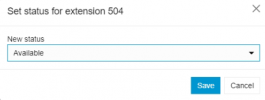
Provided you have the correct role, you can change the user status in the team tab of the webclient.
 
we are log with account system owner

ok find it thanks.

but I think it's not logic there ;-)
 
Hello, i have the same problem, i'm logged in as system ower but i cannot figure out where is this button. Can someone send a screenshot or tell me where is it in detail?
 
Provided you have the correct role, you can change the user status in the team tab of the webclient.
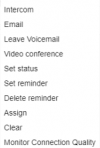
This is the right answer.. You can do this by rightclick the user you want to change on the team tab.
 
Ok, I found how to do it: you have to have the right role and be in the same department.
I assumed that as the system owner you had access to all departments, but that's not the case and that's absurd since you're a super administrator.
 
This was very helpful. I couldn't find anything in the official docs but this got me sorted. Thanks.
 
  • Like
Reactions: This username is
Hello,

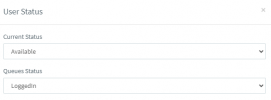
while it is true you can change the user Status i am unable to find where i can set the Queue status of the user.
v20_status.pngv20_status1.png

In V18 you could change this from the User tab, and you can change this in panel, but i dont see the Queues there even though i am in same department and system owner:
v20_status2.png


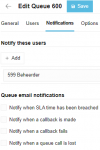
Edit: Found why panel was not working after cross reference with v18. You need to set Notify this user.
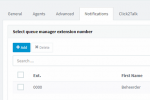
In V18 this was called "Select queue manager"

V18:
qmanage2.png
V20:
qmanage1.png
 
Last edited:
You can change a user his queue status via "Panel" yes, but you have to manually do every queue separately. We have clients with more than 100 queues, no way that doing this by hand is a good solution.

Is this the only way at this moment?
If yes, will this option come back in the future?

1709736021784.png
 
Ok, I found how to do it: you have to have the right role and be in the same department.
I assumed that as the system owner you had access to all departments, but that's not the case and that's absurd since you're a super administrator.
There should really be fix to this
 
Status
Not open for further replies.

Forum statistics

Threads
111,973
Messages
590,079
Members
164,898
Latest member
grahamaskew