Some calls are not recorded

Status
Not open for further replies.

alexsoo69

Customer
Joined
Mar 11, 2019
Messages
11
Reaction score
1
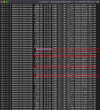
On one of our extension, some incoming calls are not recorded. Cannot see any patern to why some calls are not recorded. The calls are capture and shown on the recording screen, when downloaded it does not contain anything. Have browse to the recording directory and notice that the zero contain files comes in 2 size. 2364byte and 4412byte. have try delete the recording directory for the extension and also reboot the system. All other extension are set up with the same setting and all other is recording good.
 
Last edited:
  • Like
Reactions: alexsoo69
@alexsoo69
In addition to providing the information leejor mentioned, if the host is a Linux machine, make absolutely sure that the recording directory for that extension has the following file permissions:

drwxr-xr-x 2 phonesystem phonesystem
 
  • Like
Reactions: alexsoo69
Thanks for the suggestion. All the set are setup in the same way. And yes it is working previously. From the physical recorded file i can see that the error started about a months ago. I have just deleted the extension and re-provision it. Hopes that this will solve the problem.

@ChrisC_3CX - No it is not the file permission problem as all the outgoing call are recorded and only some of the incoming calls are missing. Not really missing, there are till file generated for the calls but there are nothing in there and the file size will always be 2364 byte or 4412 byte.
 
  • 3CX Version, Professional Annual 16.0.8.9
  • Server OS, Debian 9
  • 3CX Server Hosted in the office (mac mini)
  • IP Phone Make-panasonic /Model KX HDV230 /Firmware 08.101
  • Provisioning Method: Local
  • Trunk Provider : MyRepublic
  • Has the Firewall Checker passed: YES
  • Are custom Phone Templates being used: NO
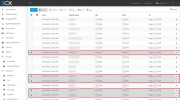
Has deleted the extension and re provision but no help. Only happen to 1 extension. Attached are the screenshot of the physical file in the directory and recording screen from 3CX dashboard. All our stuff are working from home now, hence they are all on 3CX mobile Apps. But the problem happened when she is still in the office.
1621931219521.png
1621931235843.png
 
Last edited by a moderator:
  • Server OS, Debian 9
  • 3CX Server Hosted in the office (mac mini)
When you say "Mac mini" and Debian 9, do you mean that you are running Debian 9 on the Mac mini and hosting 3CX there or are you running a Hypervisor on it that hosts a Debian 9 VM? If a hypervisor, what OS is the physical machine running (mac mini) and which hypervisor are you using?

But the problem happened when she is still in the office.
Is this to say that the issue only occurs when the user is in the office and using the "KX HDV230" but using the 3CX Mobile Client has no issues? If yes, do you have other extensions in the office using the same device as well that do not face the same issue?
 
Mac Mini is the hardware running Debian 9 OS. Downloaded the 3CX debian iso and install. It is a dedicated hardware for the 3CX. It has being working good for the past 2 years. There are no change to the configuration or hardware for the past 2 years. 3CX is on auto update.

Sorry, I mean that the problem started when she is in the office using the KX HDV230 and the issue countinue with 3CX Mobile client. All other extension in the office is using the same KX HDV230. And at this moment everybody is working from home and all are on 3CX Mobile.

As you can see from the screen capture. The lost recording are ramdom incoming calls. Some are from the call Q and some are from DID.
 
That is really strange, I would have recommended to look into the Hard Disk's health however it would not make sense to only affect one extension if it were a hardware related issue.

Please consider contacting one of our 3CX Partners to have them look into the matter further as it sounds like this would definitely need a more in-depth investigation.
 
Status
Not open for further replies.