Some recordings are not found

Status
Not open for further replies.

carmen.leroux

Bronze Partner
Advanced Certified
Joined
Jan 21, 2021
Messages
69
Reaction score
15
3CX on Debian - 18.0 build 1880
Provisioning method: SBC

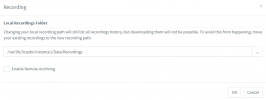
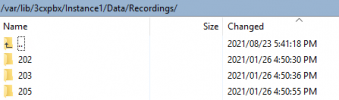
We have Record all calls enabled on all extensions under the Options tab. We rarely need to listen to the recordings but have realised today that almost all of them are not working (with the exceptions). I browsed to the recording location on my PBX and realised that the latest recording there is very old, and new recordings do not seem to be saved here.

1635945458349.png
1635945583566.png


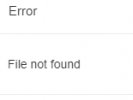
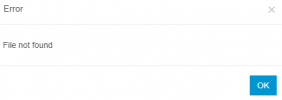
When I attempt to listen to some of the recordings (new one for today) they do work, but other recordings do not work (also today's) and I get a "File not found" error. When I download the recording I can listen to it, but the same recording is not located in the abovementioned location.
1635945699917.png
 
Did you move from Windows to Debian? When you did this, did you manually move stuff about?

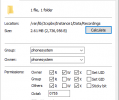
I'ts more then likely that the phonesystem user doesnt have permission to these folders. Are you able to check?
 
  • Like
Reactions: Evolute IT
Goeie dag @carmen.leroux,

Just to confirm the version, from the dashboard, on the right hand side does it say 18.0 build 1880?

Do you see a Terminal button in the PBX Status section?
 
Hi @kieferschild

Thanks for the response.

We did indeed move from Windows to Debian and restored a backup on Debian. I am not too worried about the old recordings. I cannot see today's recordings in this folder even though I can listen to them when downloading from the 3CX Management Console. I will check permissions and revert
 
Hi @kieferschild

Thanks for the response.

We did indeed move from Windows to Debian and restored a backup on Debian. I am not too worried about the old recordings. I cannot see today's recordings in this folder even though I can listen to them when downloading from the 3CX Management Console. I will check permissions and revert
Check in Reporting > Recordings the location set for recordings.
 
Hi @VasilisV_3CX

Correct, I know there is an update, we are planning to schedule this soon.

1635947324359.png

1635947343486.png
 
I can see the location as per initail screenshot, but when browsing to the location they are not there

1635947424561.png
 
Just to confirm before making changes, the phonesystem needs rwxrwxrwx (0777) access to this folder?
 
  • Like
Reactions: carmen.leroux
Hi @carmen.leroux,

I'd suggest the following:
  1. Enable verbose logging on the Management Console.
  2. Access the Web Client and play a new recording.
  3. Back to the Dashboard, Activity Log, Logs, look for the IVRlog.
  4. Search /var/lib.
  5. You'll see something saying: "LAY id = 1 : $_B = /var/lib/3cxpbx/Instance1/Data/Recordings/101/[Extension Name]_ExtensionNumber-BLAHBLAH.wav"
  6. Now you know the full path. Is it the same path as the one you showed above?
 
  • Like
Reactions: Evolute IT
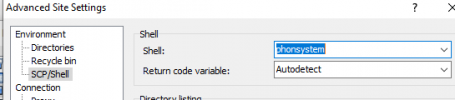
You could change the shell to phonesystem too and see if you had permission to read/write

1635948300202.png


PS - I spelt phonesystem wrong :D
 
Hi @carmen.leroux,

I'd suggest the following:
  1. Enable verbose logging on the Management Console.
  2. Access the Web Client and play a new recording.
  3. Back to the Dashboard, Activity Log, Logs, look for the IVRlog.
  4. Search /var/lib.
  5. You'll see something saying: "LAY id = 1 : $_B = /var/lib/3cxpbx/Instance1/Data/Recordings/101/[Extension Name]_ExtensionNumber-BLAHBLAH.wav"
  6. Now you know the full path. Is it the same path as the one you showed above?
The location is the same when looking at the logs. But when I play a recording that does not work (error: file not found) I do not actually see any entries on the log for that time I initiated the playback. There are loads of recordings working now, but also the other half still not working.

Example 1:
03/11/2021 16:24:06.576 [0000570b] /home/repomaster/workspace/TrunkBuild_18_0_final/Sources/Projects/Common/VoIPFileEngine/RawFile.cpp(232) /var/lib/3cxpbx/Instance1/Data/Recordings/212

I can see this recording in the folder.

Example 2:
When I try to listen to the recording I get the below error. The recording is not to be found in it's folder, BUT, I can download it from the webclient and listen through my local PC.

1635949581366.png:
 
Hi @carmen.leroux,

To clarify: I am assuming that Example 1 and Example 2 are different recordings altogether.

I'm going to PM you shortly.
 
Hi @carmen.leroux,

To clarify: I am assuming that Example 1 and Example 2 are different recordings altogether.

I'm going to PM you shortly.
Correct, Two different examples. One example of a working recording, and the other a "broken" recording
 
  • Like
Reactions: VasilisV_3CX
Status
Not open for further replies.

Forum statistics

Threads
111,975
Messages
590,084
Members
164,903
Latest member
dross