SPA3102 and 3CX on different locations New user question

Status
Not open for further replies.

tikacademy

Free User
Joined
Feb 29, 2020
Messages
5
Reaction score
0
Hello everyone,

I'm getting to know 3CX andup until now, I'm loving it. I have an old but working SPA3102 which I've found how to setup as PSTN trunk (I have some Asterisk background) and I've managed to get it registered bith as Line 1 and PSTN Line.

What's working now is inbound calls I'm trying to set outbound calls with no luck, calls just drop with this error.

SIP blah ID: 12294

Call or Registration to 364xxxx@(Ln.10000@Generic Gateway Device) has failed. 0.0.0.0 replied: 503 No DNS results; warning: No other DNS entries to try (0,0); internal

3cx Trunk is as fo9llows
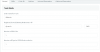
1583691722034.png
Port 5062 matches on both sides and inbound calls to PSTN line work and are forwarded to my extension.

Also note I have Registrar/Server/Gateway Hostname or IP set as "dynaic" which I'm suspecting it's the issue but I can't change the IP or FQDN for tyhe SPA3102 as I'm on a dynamic IP and also my connection is CG-NAT'ed.

Outbound calls on the other hand fail

I want to make it clear that SPA3102 is located i my office and 3cx instance is running on Amazon Light-thingy. I've got my iPhone registered fine, SPA line 1 working too.

I've set some outbound rules as per the screenshot, it's first on the outbound rule list, nothing else set.
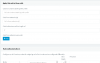
1583690586598.png

I know this topic is been talked about before but setting 8.8.8.8 on the SPA3102 and the 3CX server didn't make the trick either, thus I'm asking if you can shed a light.

Thanks to everyone.
 
Last edited:
The trunk settings in 3CX require that you put in the IP and port of the gateway (3102), or the call will not reach it. Putting in the word dynamic is not going to work. If the 3102 is located behind a router with a dynamic IP, are you able to use a DDNS service?
 
  • Like
Reactions: YiannisH_3CX
leejor, thank you very much for your reply and sorry about my late-late reply, work and COVID-19 (not infected) have changed everything.

I guess that was going to be an answer 'dynamic' does nothing.

Regarding DDNS and router, well I'm behind CGNAT (carrier grade NAT) so I guess one of the dreaded 100.X.X.X IPs which are not public, so having my SPA3102 behind a normal NAT is not going to be feasible.

I'm writing this email because I'm in a bit of a problem here, I got also one of those DINSTAR 4 SIM GSM Gateways, it's also behind a NAT but the MikroTik router it's behind a real NAT with public IP.

I'd like to know even after reading that the SPA3102 Provisioning guide is no longer available and apparently there's not guide on DINSTAR gateways.

Finally a sum of issues, after I tried adding pptpd and openvpn, trying to restart the Amazon Lightsail instance some 3CX services are stopped and won't restart.

1584851960706.png

I do have backups but after I restored a backup from March 15, the same thing happens.

Is there anyway to recover the instance (I have no snapshots) or do i have to reinstall, what happens with my license?.

Thanks for any tips yopu can provide.

The trunk settings in 3CX require that you put in the IP and port of the gateway (3102), or the call will not reach it. Putting in the word dynamic is not going to work. If the 3102 is located behind a router with a dynamic IP, are you able to use a DDNS service?
 
Re post as I cannot edit the previous post.

leejor, thank you very much for your reply and sorry about my late-late reply, work and COVID-19 (not infected) have changed everything.

I guess that was going to be an answer 'dynamic' does nothing.

Regarding DDNS and router, well I'm behind CGNAT (carrier grade NAT) so I guess one of the dreaded 100.X.X.X IPs which are not public, so having my SPA3102 behind a normal NAT is not going to be feasible.

I'm writing this email because I'm in a bit of a problem here, I got also one of those DINSTAR 4 SIM GSM Gateways, it's also behind a NAT but the MikroTik router it's behind a real NAT with public IP.

I'd like to know even after reading that the SPA3102 Provisioning guide is no longer available and apparently there's not guide on DINSTAR gateways.

*** I removed some stuff regarding services not starting after removing pptpd and openvpn everything came back to normal. ***

My main issue is that I don't really know what happened with my DINSTAR and SPA3102, they DID work for a couple of days and I can't really remember any drastic changed apart from adding some IVRs and prompts.

Thanks for any help you can provide.

Attached are the SPA3102 and DINSTAR configs.
View attachment 15025
Even though I deleted and created the GW again and now shows registered and inbound calling works on all three SIMS I have installed, outbound doesn't.

Finally I have one question on security, can I either install l2tp/pptp/openvpn server on 3cx server or another Lightsail instance and make them work like they're one the same LAN?.

Best regards.

The trunk settings in 3CX require that you put in the IP and port of the gateway (3102), or the call will not reach it. Putting in the word dynamic is not going to work. If the 3102 is located behind a router with a dynamic IP, are you able to use a DDNS service?
 
The the link to any attachments doesn't work, says I need permission to access.

From what I gather, the issue that remains is outgoing calls, on all gateways. Understandable, as getting the sip message through may be one thing, getting the correct voice ports through , may be another. If you can set up VPN, then you should be able to get it to work. How, and which version (possibly hardware related) will depend on your resources.

I have successfully used a 3102, behind a router, when travelling, and the location I was in, also had a PSTN line. Incoming PSTN calls would ring the local phone (in the phone port on the 3102), then go off to the 3CX extension voicemail if not answered. Other extensions could also use the PSTN nine for outgoing calls. In that case, the public IP of the local router did not change very often (like a year), so it could be used rather than relying on a DDNS service. The router was (luckily) also able to handle the port forwarding, of both the extension and the PSTN line datafilled in the 3102 (I was using both).

There are so many variables involved, and every installation is going to be different. You will have to persist in tracing what IP and port the outgoing call is routing to, then make changes along the way, so hat it is able to get through. As I say, still no guarantee that it will work properly. Getting two-way voice, is going to be the biggest hurdle.
 
Last edited:
Something else to consider.
Some ISPs allow you two public IPs. If the remote location uses a stand-alone modem, you may be able to connect the modem to a switch, then split to two devices, one being the 3102. some modem/ router combinations allow you to do pass-through on one of the LAN ports so that any device on that port , gets a public IP.That would give it it's own public IP.

That still won't help too much if the IP changes every day or two. The 3102 is also a router (if so optioned), so depending the set up at the remote end, it could be the DHCP server for that site. You could use the existing router as a switch/wireless access point.
 
The the link to any attachments doesn't work, says I need permission to access.

Yeah, I messed that up, it's just a screenshot of the IP trunk for the spa3102 pointing to my carrier grade natted IP.

From what I gather, the issue that remains is outgoing calls, on all gateways. Understandable, as getting the sip message through may be one thing, getting the correct voice ports through , may be another. If you can set up VPN, then you should be able to get it to work. How, and which version (possibly hardware related) will depend on your resources.

I've done the following:

I setup another lightsail instance with openvpn and xl2tpd+ipsec which seem to work, next I added an openvpn client to the 3cx instance and connected to the openvpn server fine. Great!, no BAD, as sson as openvpn connects 3cx craps out with this message:

Code:
[    6.225780] Adding 2056188k swap on /var/swap.  Priority:-1 extents:6 across:2891772k SSFS
[    9.341438] 3CXPhoneSystem[720]: segfault at 0 ip 0000561f9ebf6253 sp 00007fff22104d80 error 4 in 3CXPhoneSystem[561f9ea87000+45c000]
[   13.679489] random: crng init done
[   13.679491] random: 7 urandom warning(s) missed due to ratelimiting
[ 2307.886093] 3CXPhoneSystem[3063]: segfault at 0 ip 000055b809839253 sp 00007ffc2cff2ea0 error 4 in 3CXPhoneSystem[55b8096ca000+45c000]

I got set some complex routing rules which work and routing works so if I can get the services back up again and make openvpn behave alongside openvpn I'll have a VPN as you stated.

So basically I'm stuck with crashed sip server and some other services.

I have successfully used a 3102, behind a router, when travelling, and the location I was in, also had a PSTN line. Incoming PSTN calls would ring the local phone (in the phone port on the 3102), then go off to the 3CX extension voicemail if not answered. Other extensions could also use the PSTN nine for outgoing calls. In that case, the public IP of the local router did not change very often (like a year), so it could be used rather than relying on a DDNS service. The router was (luckily) also able to handle the port forwarding, of both the extension and the PSTN line datafilled in the 3102 (I was using both).

Yeah, I did get everything working a while back when I got the 3102 to work I had a public IP on my MikroTik router -- I know the devices -- and some networking so I'm kinda comfortable doing routing and setting up stuff but my VoIP is rusty I left that a long time ago and I took it back with 3cx which I do like.

DINSTAR is working fine for inbound calls which forward the 3 sims and my US DID to my IVR, that works but outbound is still not working.

There are so many variables involved, and every installation is going to be different. Ou will have to persist in tracing what IP and port the outgoing call is routing to, then make changes along the way, so hat it is able to get through. As I say, still no guarantee that it will work properly. Getting two-way voice, is going to be the biggest hurdle.

Thanks for all of your input it's always nie to0 se someone cares avbout posts and helping people, thanks thanks.
 
Something else to consider.
Some ISPs allow you two public IPs. If the remote location uses a stand-alone modem, you may be able to connect the modem to a switch, then split to two devices, one being the 3102. some modem/ router combinations allow you to do pass-through on one of the LAN ports so that any device on that port , gets a public IP.That would give it it's own public IP.

Huh, not mine, as I've stated I'm with a crappy ISP that is now leasing $$$ public IPs to non-residential users like me, and imposing CG-NAT. I'll try what I used to do a while back, restart and restart the modem until I got public IP and wish for the best.

That still won't help too much if the IP changes every day or two. The 3102 is also a router (if so optioned), so depending the set up at the remote end, it could be the DHCP server for that site. You could use the existing router as a switch/wireless access point.

I can certainly do that, I have four ethernet ports on the Arris modem my crappy Claro ISP gave me, I'll try to get the modem to hand me a public IP and see what happens.

again, many thank yous and KUDOS!.
 
Huh, not mine, as I've stated I'm with a crappy ISP that is now leasing $$$ public IPs to non-residential users like me, and imposing CG-NAT. I'll try what I used to do a while back, restart and restart the modem until I got public IP and wish for the best.


I can certainly do that, I have four ethernet ports on the Arris modem my crappy Claro ISP gave me, I'll try to get the modem to hand me a public IP and see what happens.

again, many thank yous and KUDOS!.
Hello

I'm just started to use 3cx. I like it Is there a guide or something to set the spa 3102 ?? I'd relly like to try to connect my pstn line to 3cx Thank you
 
I'm just started to use 3cx. I like it Is there a guide or something to set the spa 3102 ?? I'd relly like to try to connect my pstn line to 3cx Thank you
The 3102 is a great device, as was the 3000, it's predecessor. I've got about 7, and never had one cause me problems. The power supplies, yes, but not the device itself. They have many more features that most people will ever use. Unfortunately, they are no longer made, and while 3CX used to support them, complete with a Set-up guide, that is no longer available, here is no longer a big demand. If you get started, and run into problems, start a new thread in the forum and I'll try to help you get it working. There are a lot of other posts on the 3102 to look through. (use Google) Don't try to set it up remotely, at least for the PSTN port, as you will have issues. As long as it's local to the server, it's not that complicated.
 
Status
Not open for further replies.

Forum statistics

Threads
111,940
Messages
589,850
Members
164,831
Latest member
Michelle Waterson