Specific user Office Hours

Status
Not open for further replies.

double6jg

Bronze Partner
Basic Certified
Joined
Feb 4, 2021
Messages
73
Reaction score
9
When I set up a clients PBX a year or so ago I set up some special office hours for specific users and now need to change them. Unfortunately they have moved to the user's own web client area where an admin does not automatically have access. Is this intentional?

I can reset the user's web client password and log in as them but this then inconveniences the user when they return to work. Is there an alternative - I can't see one?
 
Hi @double6jg

Regarding your question, please note that the feature has indeed moved to the WebClient, but you don't need access to that extension's webclient to change their office hours.

Any extensions with System Owner rights is able to change the office hours of any extension.

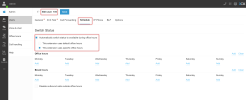
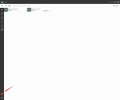
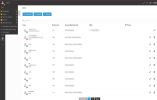
To do so navigate from the WebClient to Admin >> User >> Select the user >>Schedule. (See attached screenshots)

As you can see in the screenshots below I am logged in using an extension with System Owner rights and I am able to change any user's office hours.
 

Attachments

  • 2023-02-23_18h02_31.png
    2023-02-23_18h02_31.png
    101.1 KB · Views: 32
  • 2023-02-23_23h44_01.png
    2023-02-23_23h44_01.png
    97.2 KB · Views: 26
  • 2023-02-23_18h02_181.png
    2023-02-23_18h02_181.png
    177.7 KB · Views: 25
who came up with this stupid idea? Doesn't make any sense to move it except to annoy system administrators.
We now need to log into individual accounts and modify hours when needed and waste many hours of our time in doing so.

Do you really think the end user cares about setting their own hours? No! because they contact IT who do it for them.

Please move this function back to the main admin control panel for the tenants.
 
Please note that this feature will remain in the admin console. It will not be moved back to the management console. Additionally, the management console is going away in the next version, and the system configuration will be done via the admin console.

However, you do need to log in to every extension in order to do this as users are manageable via the admin console users section that is available to users with system owner and system administrator roles.
 
Status
Not open for further replies.

Forum statistics

Threads
111,974
Messages
590,081
Members
164,899
Latest member
mazet