


- Joined
- Mar 13, 2020
- Messages
- 7
- Reaction score
- 3
This is an issue that has come up today in which it took me an entire day of troubleshooting, several calls to Spectrum, Flowroute, and email support with 3CX.
The issue that I experienced today started like any normal cutover day. We like to have calls forwarded from the losing carrier to Flowroute (Cloud Voice provider we chose) We called spectrum and logged into clients business site, entered in the forwarding number (Temp DID). After calls are forwarded we are able to test the system with client, make sure everything works and then submit the porting paperwork.
As soon as we turned on the forwarding, we would get network is too busy, or call can't be completed at this time. We double and triple-checked our settings. Test called the temp DID - 3CX phone system rang with no issues. So began the troubleshooting. We called spectrum, first person said it wasn't their issue. We turned off forwarding and used a rollover line to continue troubleshooting.
Called flowroute - They claimed issue wasn't at their end. Support initially wasn't really able to tell me much and I felt like we were getting nowhere.
We again checked all of our settings. This worked for dozens of clients in the last few months, and our process was always the same.
We also submitted tickets to 3CX and support to their credit was fairly responsive. Sent them logs and other requested info. The system was getting authentication errors.
While this was going on I started to run my own tests to basically rule things out. I set up routing in flowroute so when a call would come into the temp DID instead of going to 3CX I had it go to my cell. That worked!! Issue began to narrow issue with 3CX, and config with inbound parameters with flowroute
On other instances that 3CX (all are cloud-hosted, with the same version) This is what was there ( Those instances didn't have a + in front of the Trunk/DID numbers.
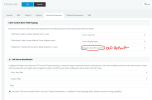
I looked at the new instance - deleted the sip trunk - readded it filled in the registration and main trunk number. Went to the same settings as above - and found it to be set this way.
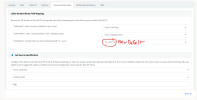
While I was waiting for support ticket responses, etc (Started this at 9:30 am, this was 2:45 in the afternoon) I went into the new instance - changed the settings to the old, went to the main trunk number and REMOVED the +.
I tested and the fracking thing worked!!!!! Call forwarding from SPECTRUM BUSINESS Lines to a Registered number within 3CX worked.
I am writing this to let others know and hopefully guide them down a much easier path. When we complete the port we will change and update the settings, but this was a nightmare to troubleshoot, and we had limited support to go with.
Link to New default inbound parameters screenshot.
Link to OLD default inbound parameters screenshot
From what I can tell there is an issue in how Spectrum is sending the formatting of the number being forwarded to Flowroute which is passing it to 3CX. Although it worked through flowroute, this setting change caused all the issues I was having.
Hope this helps someone else.
The issue that I experienced today started like any normal cutover day. We like to have calls forwarded from the losing carrier to Flowroute (Cloud Voice provider we chose) We called spectrum and logged into clients business site, entered in the forwarding number (Temp DID). After calls are forwarded we are able to test the system with client, make sure everything works and then submit the porting paperwork.
As soon as we turned on the forwarding, we would get network is too busy, or call can't be completed at this time. We double and triple-checked our settings. Test called the temp DID - 3CX phone system rang with no issues. So began the troubleshooting. We called spectrum, first person said it wasn't their issue. We turned off forwarding and used a rollover line to continue troubleshooting.
Called flowroute - They claimed issue wasn't at their end. Support initially wasn't really able to tell me much and I felt like we were getting nowhere.
We again checked all of our settings. This worked for dozens of clients in the last few months, and our process was always the same.
We also submitted tickets to 3CX and support to their credit was fairly responsive. Sent them logs and other requested info. The system was getting authentication errors.
While this was going on I started to run my own tests to basically rule things out. I set up routing in flowroute so when a call would come into the temp DID instead of going to 3CX I had it go to my cell. That worked!! Issue began to narrow issue with 3CX, and config with inbound parameters with flowroute
On other instances that 3CX (all are cloud-hosted, with the same version) This is what was there ( Those instances didn't have a + in front of the Trunk/DID numbers.
I looked at the new instance - deleted the sip trunk - readded it filled in the registration and main trunk number. Went to the same settings as above - and found it to be set this way.
While I was waiting for support ticket responses, etc (Started this at 9:30 am, this was 2:45 in the afternoon) I went into the new instance - changed the settings to the old, went to the main trunk number and REMOVED the +.
I tested and the fracking thing worked!!!!! Call forwarding from SPECTRUM BUSINESS Lines to a Registered number within 3CX worked.
I am writing this to let others know and hopefully guide them down a much easier path. When we complete the port we will change and update the settings, but this was a nightmare to troubleshoot, and we had limited support to go with.
Link to New default inbound parameters screenshot.
Link to OLD default inbound parameters screenshot
From what I can tell there is an issue in how Spectrum is sending the formatting of the number being forwarded to Flowroute which is passing it to 3CX. Although it worked through flowroute, this setting change caused all the issues I was having.
Hope this helps someone else.


