/usr/lib/3cxpbx/PbxConfigTool -renew-certificates
root@3cxdebian:~# su phonesystem
$ sr/lib/3cxpbx/PbxConfigTool -renew-certificates
sh: 1: sr/lib/3cxpbx/PbxConfigTool: Permission denied
$ /usr/lib/3cxpbx/PbxConfigTool -renew-certificates
_____ _______ __
|__ // ____/ |/ /
/_ </ / | /
___/ / /___ / |
/____/\____//_/|_|
Welcome to the 3CX Configuration Tool
Help https://www.3cx.com/docs/manual/
$ exit
root@3cxdebian:~# reboot
The command is correct, you didnt follow the instructions.Unfortunately, this does not work. You can't see whether anything is happening at all.
The command in the article is not correct either.
Bash:/usr/lib/3cxpbx/PbxConfigTool -renew-certificates
I ran the following, waited 10 minutes and then restarted the system.
Bash:root@3cxdebian:~# su phonesystem $ sr/lib/3cxpbx/PbxConfigTool -renew-certificates sh: 1: sr/lib/3cxpbx/PbxConfigTool: Permission denied $ /usr/lib/3cxpbx/PbxConfigTool -renew-certificates _____ _______ __ |__ // ____/ |/ / /_ </ / | / ___/ / /___ / | /____/\____//_/|_| Welcome to the 3CX Configuration Tool Help https://www.3cx.com/docs/manual/ $ exit root@3cxdebian:~# reboot
Unfortunately, the command is not correct. At least that's the error I'm getting here:The command is correct, you didnt follow the instructions.
root@3cxdebian:~# su phonesystem
$ sr/lib/3cxpbx/PbxConfigTool -renew-certificates
sh: 1: sr/lib/3cxpbx/PbxConfigTool: Permission denied
The firewall check via the web interface shows no errors. Is there anything else I can check?Come on, thats just a typo...
Did you set the parameter correctly? Did you you check your firewall?
root@3cxdebian:~# su phonesystem
$ /usr/lib/3cxpbx/PbxConfigTool -renew-certificates
_____ _______ __
|__ // ____/ |/ /
/_ </ / | /
___/ / /___ / |
/____/\____//_/|_|
Welcome to the 3CX Configuration Tool
Help https://www.3cx.com/docs/manual/
$ exit
root@3cxdebian:~# service nginx restart
root@3cxdebian:~# service nginx status
● nginx.service - A high performance web server and a reverse proxy server
Loaded: loaded (/lib/systemd/system/nginx.service; enabled; preset: enable>
Active: active (running) since Fri 2025-03-28 11:32:22 CET; 4s ago
Docs: man:nginx(8)
Process: 76027 ExecStartPre=/usr/sbin/nginx -t -q -g daemon on; master_proc>
Process: 76029 ExecStart=/usr/sbin/nginx -g daemon on; master_process on; (>
Main PID: 76030 (nginx)
Tasks: 3 (limit: 4652)
Memory: 5.9M
CPU: 51ms
CGroup: /system.slice/nginx.service
├─76030 "nginx: master process /usr/sbin/nginx -g daemon on; maste>
├─76031 "nginx: worker process"
└─76032 "nginx: worker process"
Mär 28 11:32:21 3cxdebian systemd[1]: Starting nginx.service - A high performan>
Mär 28 11:32:21 3cxdebian nginx[76027]: 2025/03/28 11:32:21 [warn] 76027#76027:>
Mär 28 11:32:22 3cxdebian nginx[76029]: 2025/03/28 11:32:22 [warn] 76029#76029:>
Mär 28 11:32:22 3cxdebian systemd[1]: Started nginx.service - A high performanc>
lines 1-19/19 (END)...skipping...
● nginx.service - A high performance web server and a reverse proxy server
Loaded: loaded (/lib/systemd/system/nginx.service; enabled; preset: enable>
Active: active (running) since Fri 2025-03-28 11:32:22 CET; 4s ago
Docs: man:nginx(8)
Process: 76027 ExecStartPre=/usr/sbin/nginx -t -q -g daemon on; master_proc>
Process: 76029 ExecStart=/usr/sbin/nginx -g daemon on; master_process on; (>
Main PID: 76030 (nginx)
Tasks: 3 (limit: 4652)
Memory: 5.9M
CPU: 51ms
CGroup: /system.slice/nginx.service
├─76030 "nginx: master process /usr/sbin/nginx -g daemon on; maste>
├─76031 "nginx: worker process"
└─76032 "nginx: worker process"
Mär 28 11:32:21 3cxdebian systemd[1]: Starting nginx.service - A high performan>
Mär 28 11:32:21 3cxdebian nginx[76027]: 2025/03/28 11:32:21 [warn] 76027#76027:>
Mär 28 11:32:22 3cxdebian nginx[76029]: 2025/03/28 11:32:22 [warn] 76029#76029:>
Mär 28 11:32:22 3cxdebian systemd[1]: Started nginx.service - A high performanc>
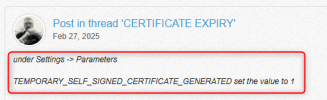
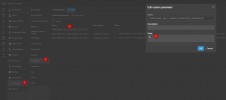
Oh man am I stupid! Thanks for the precise hint! The extension has now worked. Do I have to set the parameter back to “0” afterwards?You need to go into the PBX and set the TEMPORARY_SELF_SIGNED_CERTIFICATE_GENERATED parameter to 1 to be able to run the command.
View attachment 47186
View attachment 47187
Founded in 2005, when VoIP was an emerging technology, 3CX has gone on to establish itself as a global leader in business communications.